The Case for OpenUSD: What It Solves for Your Teams
I remember sitting in my cubicle at DreamWorks Animation in 2016 when Pixar open-sourced Universal Scene Description. I was poring over the documentation website trying to understand what value OpenUSD could provide for my team. We had recently started using Alembic for interchange, and we were pleased with the results. DreamWorks also already had a proprietary scene description with a concept similar to OpenUSD layers, though it was starting to show its age. Could OpenUSD really be worth the massive undertaking of adopting it?
Years later, on the NVIDIA Omniverse Discord server, mechanical engineers, roboticists, and architects would ask me the same question. Talking with these domain experts, I found that many of the problems that OpenUSD solved were not unique to animation and VFX. They were workflow problems: too many tools, too many people touching the same data, and scenes that were too big to work with. Those problems show up anywhere teams build things together in 3D.
This post is the first in a series for people preparing for the OpenUSD Associate certification. The exam is aimed at workflow specialists who may need to champion OpenUSD within their organizations. By the end of this post, you should be able to name the problems OpenUSD solves, explain them to both an executive and an engineer, and judge whether they’re problems your organization actually has.
“Our Tools Don’t Talk to Each Other”#
There is no one tool to rule them all. That is, there isn’t one tool that can do everything. People will also choose the best tool for the job, or even just the tool they prefer. When work on a project spans multiple tools, you have a data pipeline, whether you realize it or not. At some point, you’re exporting content from one tool so that another tool can use it. For 3D content, this often means using open file formats like OBJ, glTF, or STEP to interchange data between your tools.
Each of those formats was designed for a specific job. OBJ stores geometry. glTF is built for delivering finished assets to viewers and the web. STEP describes precise CAD geometry for engineering. As you move data around through these interchange formats, somewhere along the line, data gets left behind, and someone on your team needs to rebuild it.
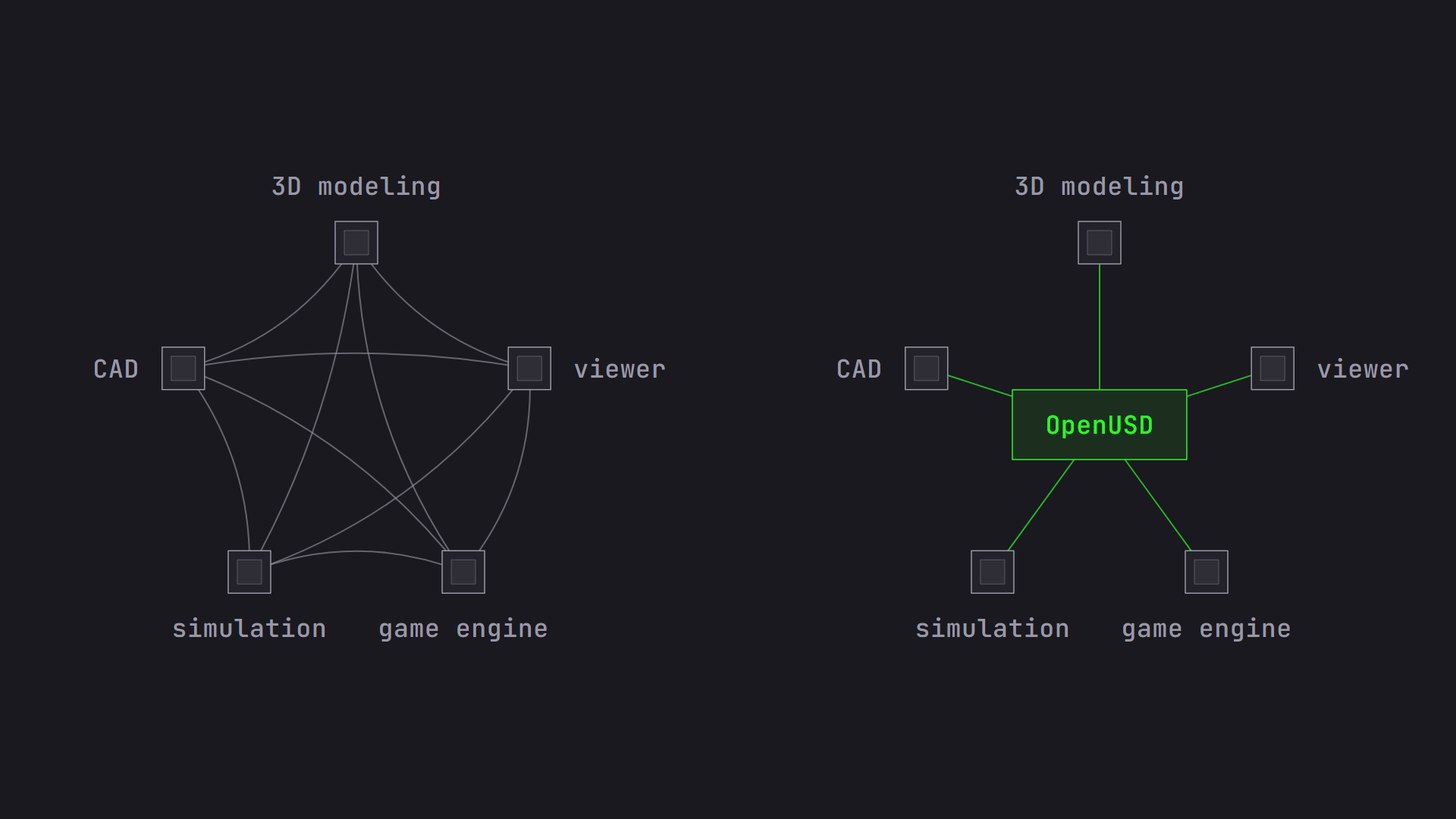
OpenUSD gives your tools a common language that is broad enough to describe the whole scene, not just one part of it. Out of the box, it can describe geometry, materials, cameras, lights, volumes, and skeletal animation. Over the years, the community has added data models for physics, MaterialX materials, semantic labels for AI and simulation, and Gaussian splats. If your domain needs something that doesn’t exist yet, OpenUSD can be extended with new data models (schemas) without breaking the tools that don’t understand them.
As it turns out, the One Ring metaphor works even better for one capability that makes OpenUSD more of a hub than just another file format. File format plugins let OpenUSD read and write other formats as if they were native to OpenUSD. OpenUSD ships with plugins for Alembic and MaterialX, and Adobe has released plugins for formats like FBX, glTF, SBSAR, and STL. Your existing assets can be included in an OpenUSD scene without a big conversion project. One file format to rule them all is pretty sweet.
When you make OpenUSD your hub, you unlock another benefit. If all of your apps read and write the same scene description, a validation script, an optimization tool, or a statistics query tool works across your whole pipeline. You don’t have to create a separate version for every application.
To be clear, OpenUSD doesn’t make translation between tools free. Units, up-axis conventions, and tool-specific features still need a plan, and I’ll cover those pitfalls later in this series in OpenUSD Pitfalls When Moving Data Between Tools. What OpenUSD does is reduce the number of translations. Instead of every tool exporting to every other tool, each tool only needs to speak OpenUSD.
Now, you may be asking whether yet another file format is really the solution. “The format I’m using already does 90% of what I need. Why should I bother with OpenUSD?” That’s fair. OpenUSD’s scene description capabilities are noteworthy, and its extensibility is an important part of its claim to universality, but other formats do this too. If this were the only benefit of OpenUSD, I wouldn’t recommend it. But this is only the first benefit. In the next section, we will see how OpenUSD uniquely excels at aggregating 3D work across tools and multiple users.
How to pitch it:
- To a stakeholder: “With OpenUSD, our teams keep their preferred tools, and we stop spending money rebuilding data every time it changes hands.”
- To an engineer: “OpenUSD is one extensible format with plugin support for the formats we already have, so pipeline tools are written once instead of per application.”
“People Overwrite Each Other’s Work”#
As a project grows to include more assets or more people, collaboration can quickly spiral out of control without a clear process. Common approaches are a single shared file that one person edits at a time, copies of that file that someone has to merge by hand later, or inflexible processes where data flows in one direction, like on an assembly line. In each case, people wait on each other, and sooner or later someone saves over someone else’s changes.
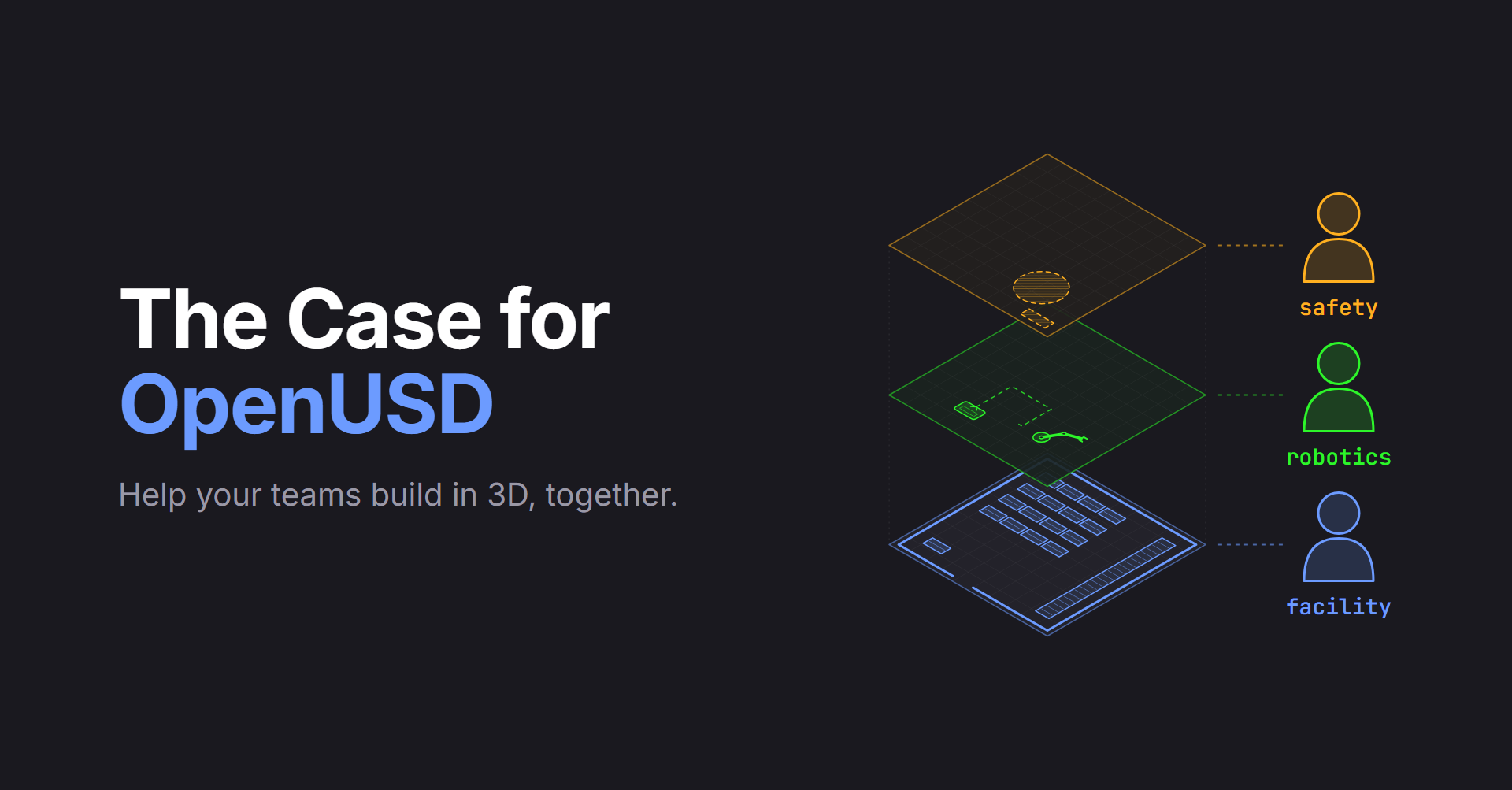
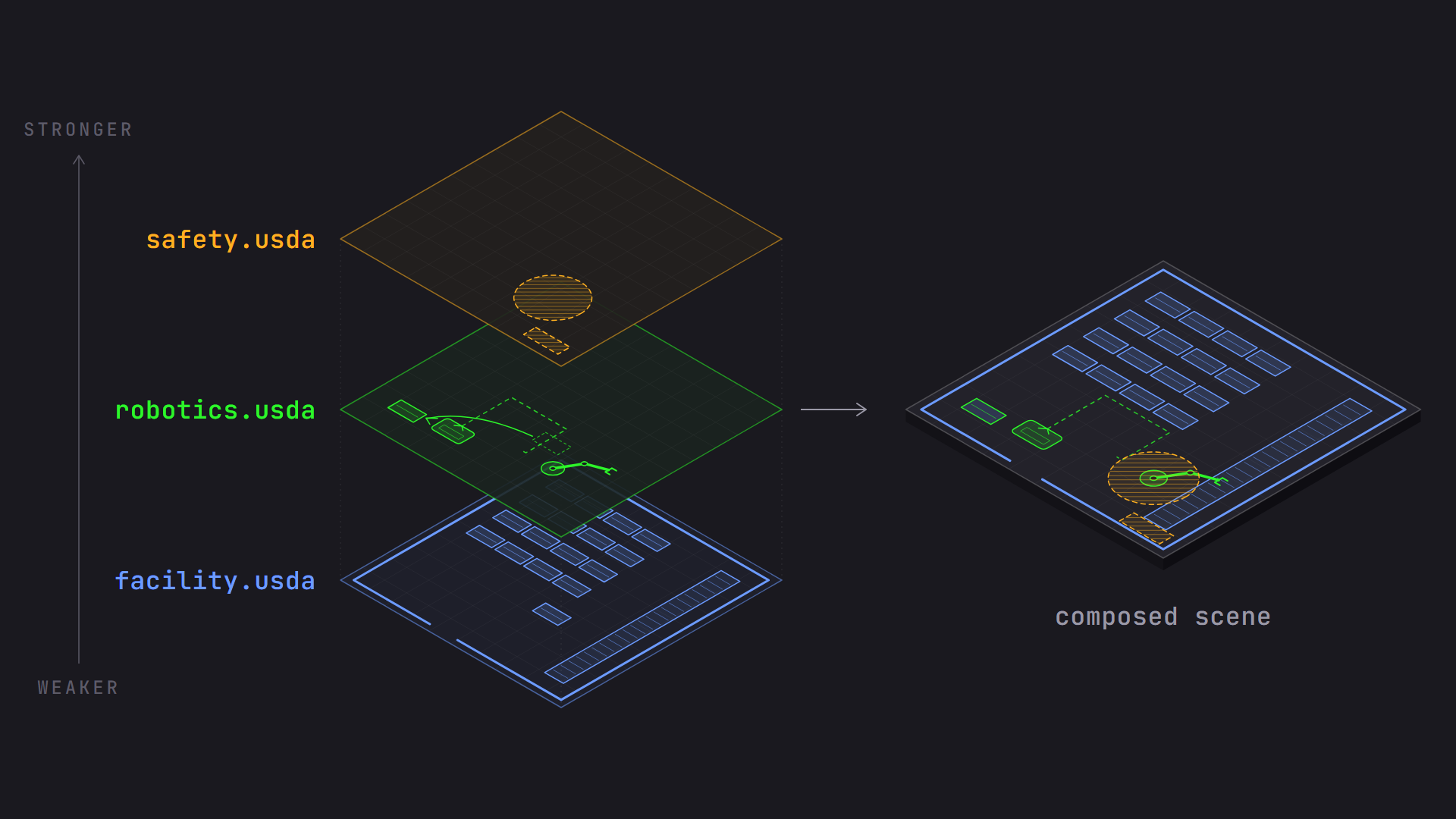
This is where OpenUSD stops being just a file format and starts being a pipeline solution. In OpenUSD, a scene is assembled from layers, and each layer can hold one team’s opinions about the scene. For example, in a factory workcell, the facility team owns a layer with the building and the racks. The safety team adds keep-out zones in its own layer. The robotics team can adjust the arm’s position for a specific cell in its own layer. Nobody edits anyone else’s file.
When OpenUSD combines those layers, it follows clear rules about whose opinion wins when two layers disagree. Say the robotics team needs a rack moved to make room for its robot. Instead of editing the facility team’s file, they move the rack in their own layer. The facility team can review the change and adopt it, or the robotics team can throw it away, and the original rack placement is still there, untouched. This is called non-destructive editing. Because each team works in its own layer, teams can also work in parallel instead of waiting their turn.
OpenUSD calls these rules strength ordering (LIVERPS), and it’s the heart of what makes OpenUSD different from other formats. We’ll learn the rules in LIVERPS Composition Arcs, Prioritized: Master These 4 First and design a layer strategy around them in Designing a Layered Asset Pipeline Using OpenUSD.
How to pitch it:
- To a stakeholder: “With OpenUSD, our teams can work at the same time without blocking or overwriting each other, and every change can be traced back to the team that made it.”
- To an engineer: “OpenUSD uses layer-based composition with defined strength ordering, so each department owns its own files and overrides are sparse and reversible.”
“We Keep Copies of the Same Asset for Every Version”#
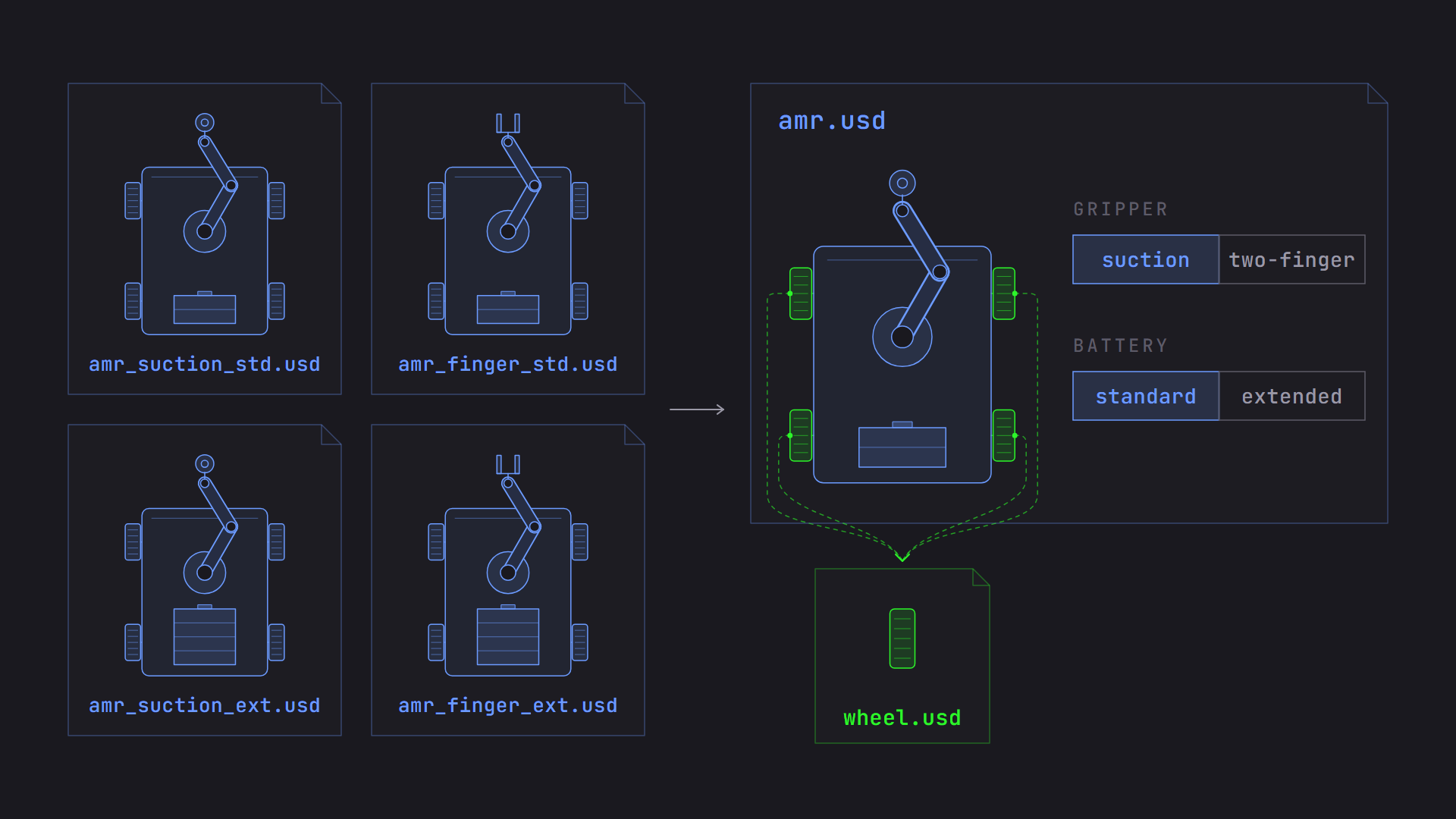
An autonomous mobile robot (AMR) with an arm might come with two grippers: a suction gripper and a two-finger gripper. The AMR can carry a standard battery or an extended one. Without a better option, teams usually save one file per combination. Four combinations become four files, and when the arm’s base changes, someone has to update all four. Add a third gripper and you have six.
OpenUSD improves this situation by introducing reuse in two ways:
- References let you build an asset once and reuse it everywhere. The AMR has four wheels, and each one points back to one source wheel asset, so a fix to the source wheel is a fix everywhere.
- Variants let one asset carry its own alternatives. The AMR asset contains a “gripper” choice with suction and two-finger options, and each scene picks the one it needs. The shared parts of the AMR live outside the variants, so they only exist once.
The pattern scales well beyond grippers. A product line can have trim levels, a building can have finish packages, and a character can have costumes, all without duplicating the asset.
How to pitch it:
- To a stakeholder: “With OpenUSD, we can maintain one source of truth per asset, so a design change gets made once and shows up everywhere.”
- To an engineer: “With OpenUSD, we can stop forking assets by using references for reuse and variant sets for configurations.”
“Our Scenes Are Too Big to Open”#
A single robot arm is manageable. A full distribution center with hundreds of racks, thousands of products, and detailed CAD for every machine is not. When a scene is too big, people stop opening it. Teams make do with screenshots or isolated parts without the full context. Sometimes someone spends hours trying to optimize a scene to get the full context to load faster for review.
OpenUSD was built for scenes like Pixar’s films, where a single shot can contain enormous amounts of data. A few features make a big difference:
- Payloads let you load parts of a scene only when you need them. Operations can open the whole facility with the detailed machine interiors left unloaded, and then load the one cell they want to inspect.
- Instancing lets hundreds of identical racks share one copy of their data in memory instead of hundreds of copies.
- The binary format (.usdc) is designed for speed. It only reads the data you actually access, compresses it efficiently, and OpenUSD can assemble the scene using multiple CPU threads.
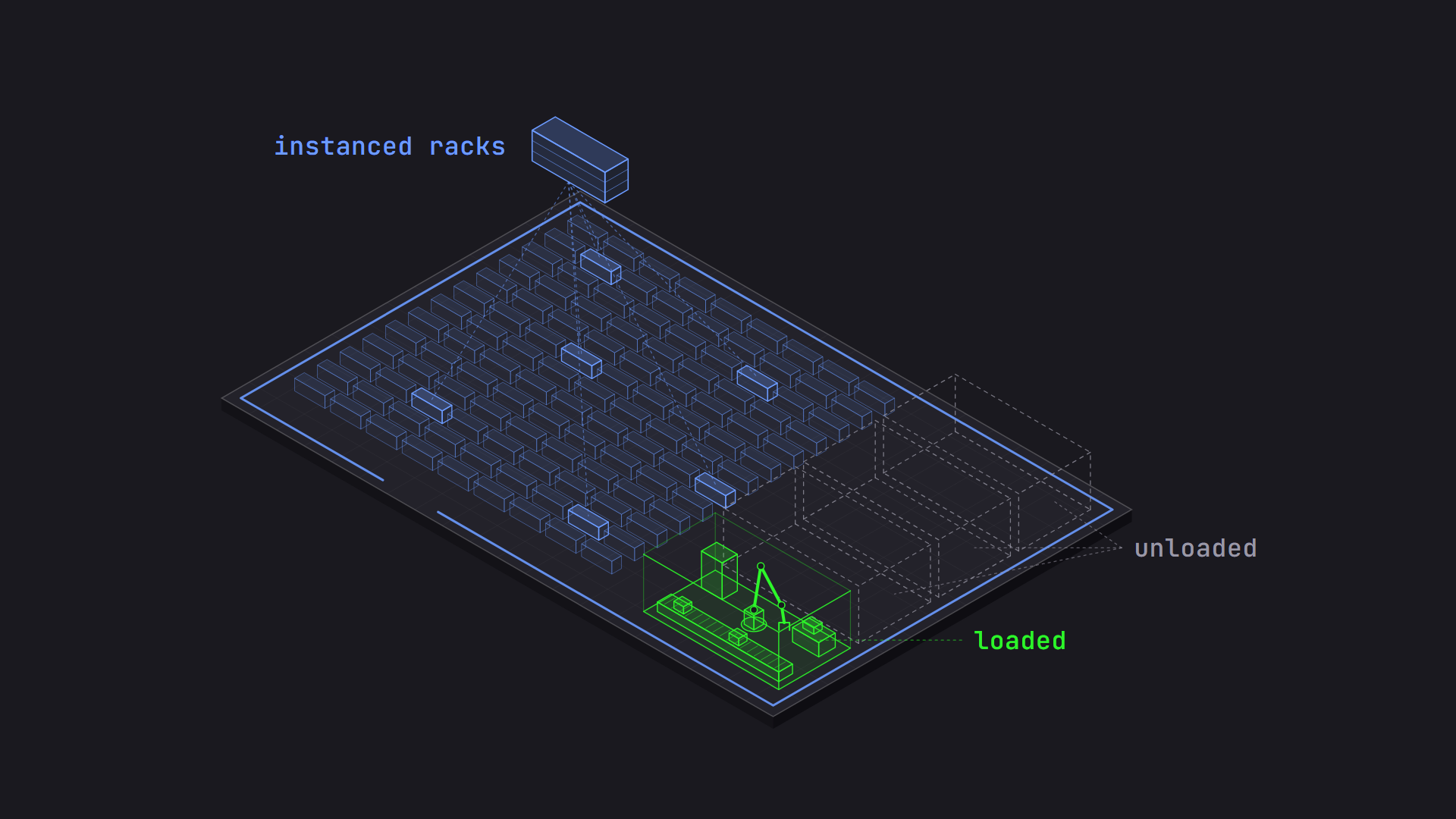
Choosing the right feature depends on where your actual bottleneck is, and I’ll dig into that in Scaling Big Scenes in OpenUSD.
How to pitch it:
- To a stakeholder: “With OpenUSD, everyone can review the whole project on their own machine, not just the part that fits.”
- To an engineer: “With OpenUSD, we can keep working sets small by using payloads for deferred loading, instancing for repetition, and the lazy-loading binary format.”
“We Need to See It in Different Renderers”#
Different people need to see the same scene in different ways. An engineer wants a fast, interactive view while reviewing clearances. Marketing wants a photorealistic image for a customer presentation. A simulation team needs sensor-accurate rendering for training a robot. Traditionally, each of those renderers lives inside a different application with its own scene format, so the data has to be exported and set up again for each one.
OpenUSD includes Hydra, a framework that connects a scene to a renderer through plugins called render delegates. An application that supports Hydra can switch between renderers without changing the scene. There are render delegates for real-time renderers like Pixar’s Storm and NVIDIA’s RTX renderer, and for offline renderers like RenderMan, Arnold, and Karma.
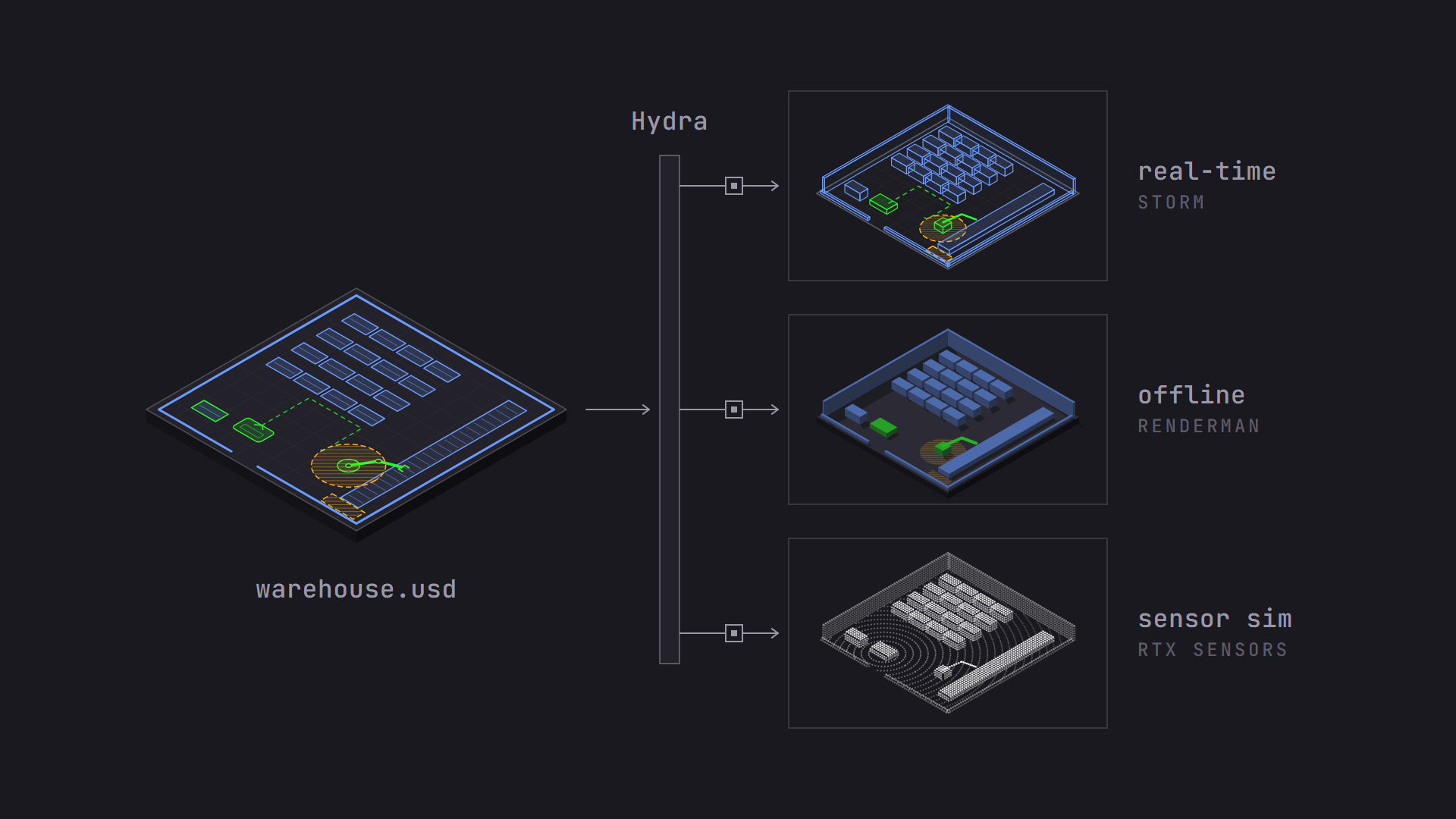
Admittedly, swapping renderers is easy, but getting identical results is not. Two renderers may interpret materials and lights differently. I’ll cover why two viewers can disagree and why OpenUSD is equipped to tackle that problem in OpenUSD Pitfalls When Moving Data Between Tools.
How to pitch it:
- To a stakeholder: “The same OpenUSD scene feeds interactive reviews and final-quality images with no separate export for each.”
- To an engineer: “Hydra decouples the scene from the renderer, so we can choose real-time or offline render delegates per task.”
“Our Data Lives Everywhere”#
In most organizations, 3D data doesn’t live in one place. CAD models sit in a product lifecycle management (PLM) system, textures sit on a file server, and the latest robot paths sit in a database. Someone has to gather it all before anyone can see the full picture, and by the time they do, some of it is out of date.
OpenUSD data is usually stored in files on disk, but it doesn’t have to be. When an OpenUSD scene points to an asset, it uses an identifier, and a plugin called an asset resolver decides what that identifier means. Organizations write resolvers that fetch data from asset management systems, databases, or cloud storage, and that data appears in the scene as if it were a local file. A resolver can also pin each asset to a specific version, which is a big part of consistently reproducing a scene setup when teams are working in parallel and publishing new asset versions frequently.
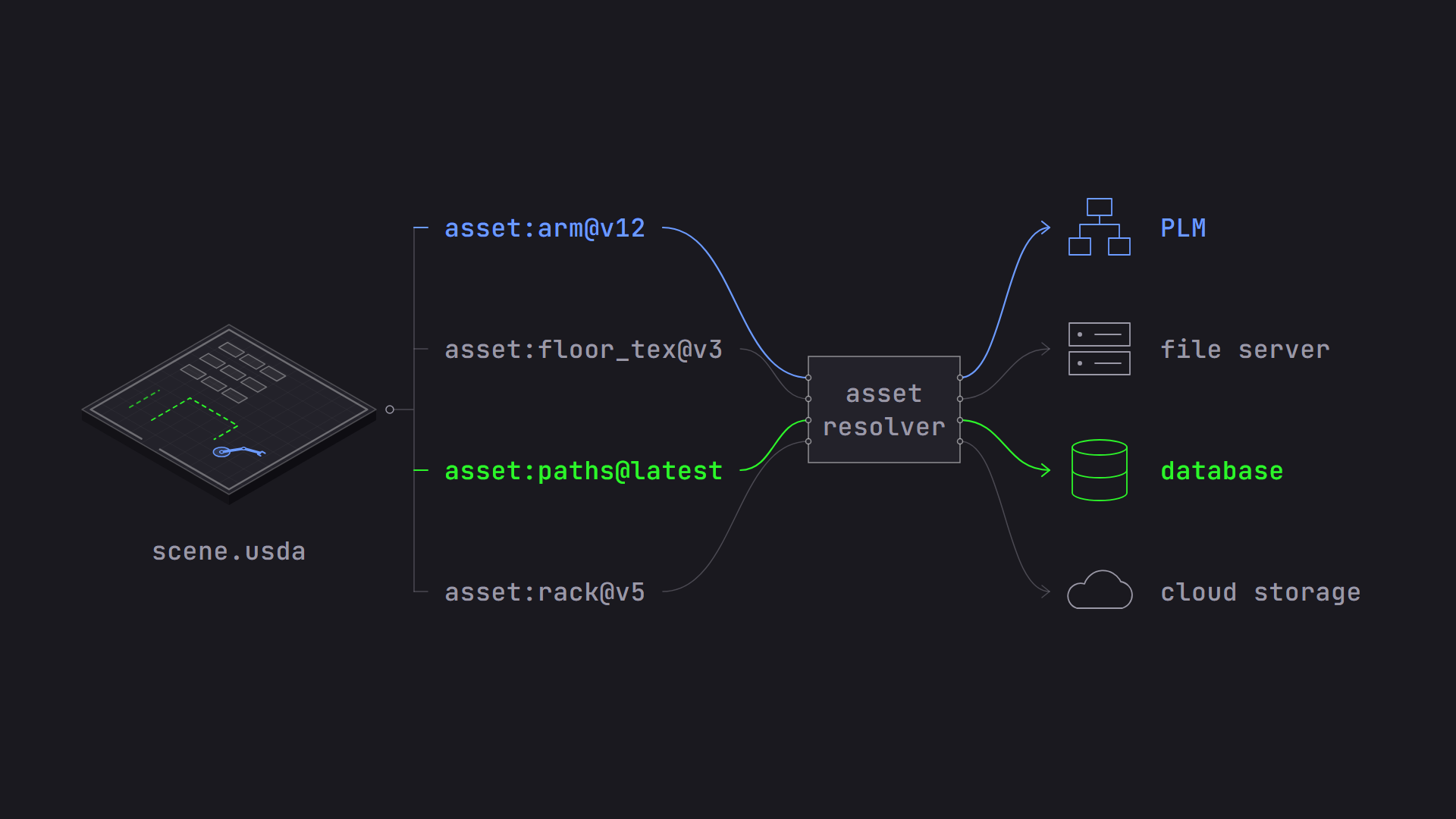
It’s important to know this option exists. It means adopting OpenUSD doesn’t require moving all your data into one new system first.
How to pitch it:
- To a stakeholder: “We can bring data from the systems we already have into one view, without a migration project.”
- To an engineer: “A custom asset resolver maps asset identifiers to our PLM, database, or object storage. The same feature can also be used for versioning and version pinning.”
“Will This Still Matter in 10 Years?”#
This is often the first question asked by teams that are building and supporting products with a long product lifecycle in mind. It’s a fair question. Adopting OpenUSD takes real effort, and nobody wants to rebuild their pipeline around a technology that disappears.
Here is what I offer for that concern:
- OpenUSD is proven in production: Pixar built OpenUSD to make its own films and has used it in production for years. Visual effects and animation studios across the industry have since adopted it, including DreamWorks, where I watched it happen. But it’s not just in media and entertainment.
- OpenUSD is cross-industry: Apple built OpenUSD into its XR framework, manufacturers use OpenUSD for factory digital twins, and robotics teams use it to build simulation digital twins.
- OpenUSD is open source: With a permissive license that is similar to Apache 2.0, companies can use it, extend it, and ship it in commercial products without licensing fees.
- OpenUSD is being standardized: In 2023, Pixar, Adobe, Apple, Autodesk, and NVIDIA founded the Alliance for OpenUSD (AOUSD) under the Linux Foundation’s Joint Development Foundation. The alliance is writing formal specifications for OpenUSD so it can become a true standard, the way HTML is for the web.
When a technology is open, governed by a cross-industry alliance, and used in production by competitors who all depend on it, it’s very hard for it to disappear.
How to pitch it:
- To a stakeholder: “OpenUSD is an open standard backed by the major companies in our industry, so we aren’t locked into a single vendor.”
- To an engineer: “OpenUSD is permissively licensed, actively maintained, and it has a formal specification on the way through AOUSD.”
Does Your Team Need OpenUSD?#
Not every team needs OpenUSD, and championing it starts with an honest look at where your team’s work actually breaks down. Ask yourself:
- Tools: Does the same data get exported, converted, or rebuilt more than once on its way through your pipeline?
- Collaboration: Do people wait for someone else to finish with a file, or redo work because someone saved over it?
- Copies: Do you maintain separate files for each configuration or option of the same asset?
- Scale: Do people review screenshots or partial scenes because the full scene is too slow or too heavy to open?
- Renderers: Do you set up the same scene more than once to view it in different renderers?
- Data: Does someone have to gather data from several systems before anyone can see the full picture?
- Longevity: Do your products or projects need their data to stay usable for a decade or more?
If you answered “yes” to one or two, you already have the start of a case for OpenUSD. If you answered “yes” to most of them, don’t try to solve them all at once. Pick the one that costs your teams the most time today, and start there. Either way, when you make the case for it, lead with the problem your team actually has, not the feature that solves it.
Which of these problems costs your team the most time? Tell me in the comments. I’d love to hear where OpenUSD fits, or doesn’t fit, in your work.
And if you’re preparing for the OpenUSD Associate certification and something in this post didn’t click, ask your question below. It might shape a future post in this series.
If you want a quick overview to share with your team, NVIDIA’s short video makes a good companion to this post:
Comments