Speaking OpenUSD: Stages, Layers, Prims, and the Words Around Them
Series: OpenUSD Foundations and Workflows Certification [part 2/2]
- 01 The Case for OpenUSD: What It Solves for Your Teams
- 02 Speaking OpenUSD: Stages, Layers, Prims, and the Words Around Them <- you are here
Introduction#
I’ve been in far more meetings than I care to admit where I was talking about a USD assembly thinking that everyone was following along, but in reality they had a different understanding of what an assembly was because of their industry background or technologies they’ve used. To a mechanical engineer, an assembly is a collection of parts joined together. In OpenUSD, it’s a specific kind of group with its own rules. Same word with different meaning and nobody noticed during the meeting.
OpenUSD uses a lot of terminology. Some of it is unique to the technology and doesn’t come from 3D or any industry you’ve worked in. Other terms sound familiar but mean something different here, and they collide with the words your teams already use. This is a complex subject matter, so it pays to learn the terms. When a stakeholder and a developer use the same word to mean different things, you find out late, usually after someone has built the wrong thing.
This post is the second in a series for people preparing for the OpenUSD Foundations and Workflows certification. The goal is not to list every term in the OpenUSD glossary. It’s to give workflow stakeholders and developers a common foundation, and to highlight the terms you’re most likely to meet as an end user of OpenUSD. By the end, you should be able to read a USD scene and say what each part of it is, almost like reading a sentence.
I’ll use the warehouse robot workcell from the last post as our example: an autonomous mobile robot (AMR) with a pick arm, shelving racks, and a conveyor. I’ll also touch on composition here, but only briefly. Composition gets its own post.
Layers and the Stage#
First, layers. These are the documents that contain the scene description data. They’re often USD files on disk, but as I covered under data that lives in many systems in the last post, OpenUSD is flexible about how these documents are stored. A scene could be made up of a single layer, but in a production it’s often thousands. A production will typically break a scene down into smaller assets, and each asset into even smaller units of work. If you have a few hundred unique assets and each one is made of several layers, you can see how you arrive at thousands of layers. Layers let teammates work in parallel by authoring into just the layers they’re focused on, so they don’t block each other.
We call the scene that’s made up of one or more layers a stage. The stage is the result of evaluating all of the content in the layers and deciding how to piece it together. The rules for piecing it together are called composition arcs. A stage isn’t a file. It’s a live, composed view that a tool builds in memory, and when you save your work, you save layers, not the stage. When you work with USD, the stage is usually your entry point. A stage might represent a single asset, many assets assembled into a set or location, a shot, or a scenario, depending on the granularity your work requires. For example, a mechanical engineer may work on a stage with only a single part from a robot. A roboticist training a new policy may be working on a stage with the assembled robot in a workcell environment.
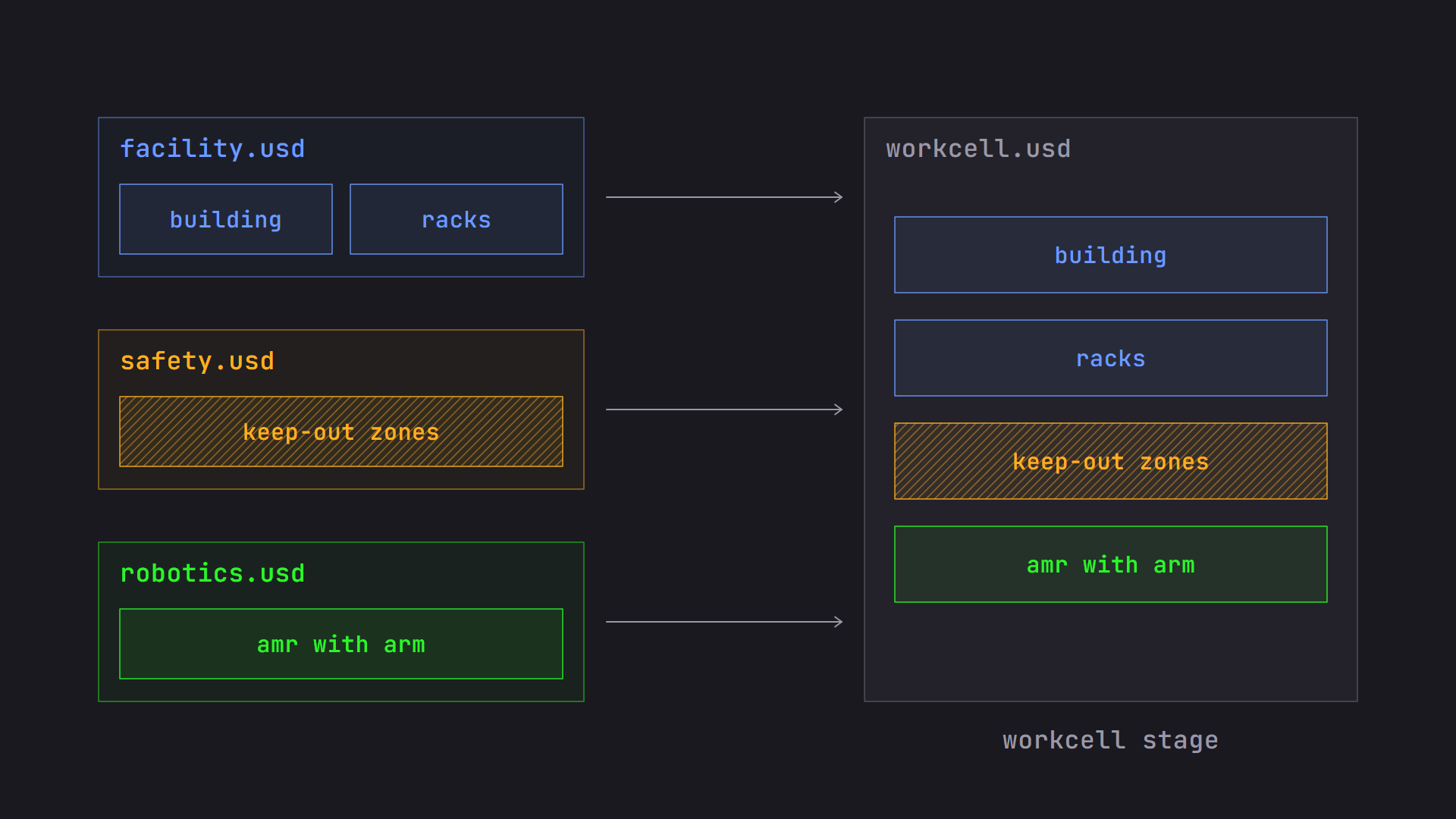
In our workcell, the facility team’s layer holds the building and the racks. The safety team’s layer holds keep-out zones. The robotics team’s layer holds the AMR and its arm. To get one workcell stage, a tool opens a main layer, called the root layer, and that layer pulls in the others using composition arcs.
One more word belongs here: opinion. When a layer says something about the scene, such as “this rack sits at this position,” that statement is an opinion. When layers give different values for the same thing, the strongest opinion wins, and that’s what the stage shows. The losing opinions are still sitting in their layers, untouched. That’s what makes non-destructive editing possible. How the winner is chosen is the subject of LIVERPS Composition Arcs, Prioritized: Master These 4 First.
Prims and Properties#
If the stage is the whole scene, what’s inside it? Everything on a stage is organized as a hierarchy of prims, short for primitives. If you’ve used a file system, a scene graph, or an outliner, you already know the shape. Each prim has a name and a place in the tree, and its full address is called a path.
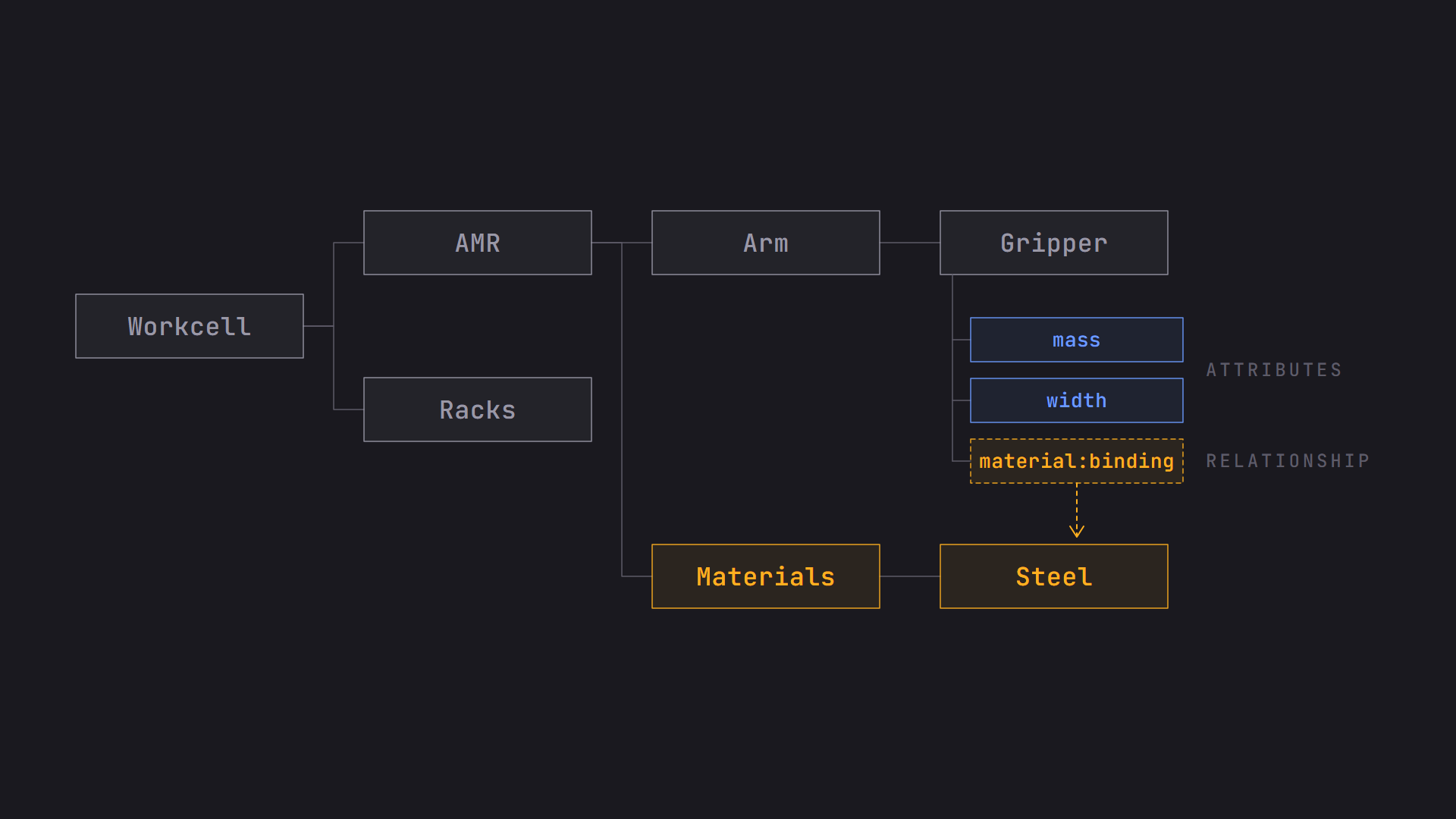
In the workcell, you might have /Workcell, then /Workcell/AMR, then /Workcell/AMR/Arm, and /Workcell/AMR/Arm/Gripper. That last string is the path to the gripper. Paths are how everything in USD refers to everything else, so you’ll see them constantly in tools, logs, and bug reports.
Prims are the containers. It’s helpful to think of them as objects or entities within the scene. They could be visual or non-visual containers. What they hold is properties, and properties come in two kinds: attributes and relationships.
Attributes and Relationships#
An attribute holds a typed value. Think of a position, a color, a radius, a mass, or a list of points that make up a mesh. The type matters. A float is a decimal number, a color is three floats, and a tool can’t quietly treat one as the other.
A relationship doesn’t hold a value. It points to other objects in the scene, usually prims, but also properties, by path. The most common one you’ll meet is material binding: a mesh has a relationship to the material prim that should shade it. Another is a collection, which is a named set of prims that other things can refer to as a group. A collection stores its members as relationships. In our workcell, you could define a collection of every rack and then assign one material to all of them at once.
The way I think about it: attributes are what a prim has, and relationships are what a prim is connected to. If you’re asking “What’s the gripper’s mass?”, that’s an attribute. If you’re asking “Which material does this gripper use?”, that’s a relationship.
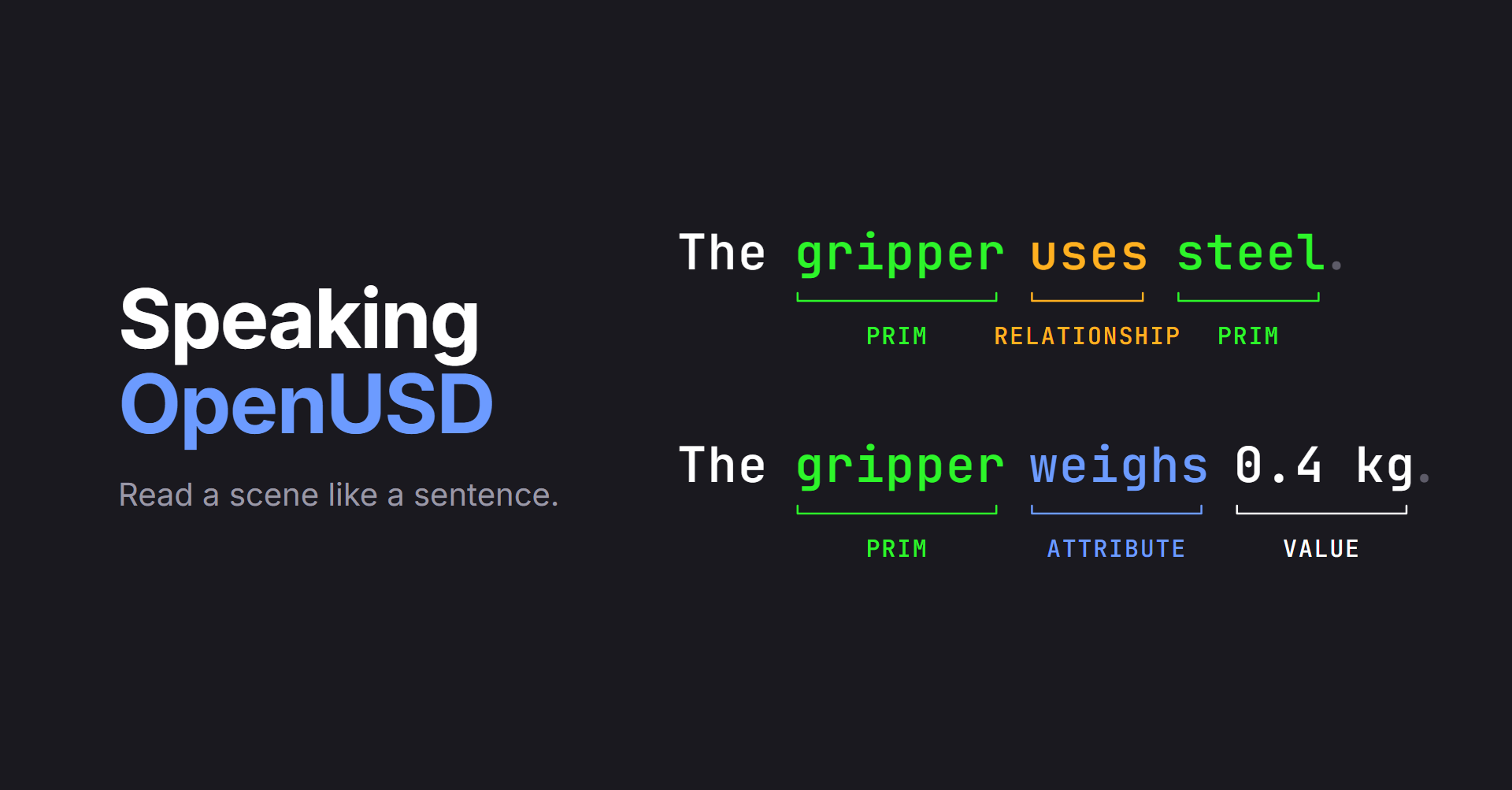
Here’s another way to hold both ideas at once: read the scene like a sentence. In “The gripper uses steel,” the word uses connects two prims, so it’s a relationship. In “The gripper weighs 0.4 kg,” the word weighs gives the gripper a value, so it’s an attribute and 0.4 kg is its value. Prims are the nouns, relationships point from one noun to another, and attributes describe a noun with a value. That’s the sentence on this post’s cover.
There’s one attribute flavor worth knowing by name. Primvars are attributes that carry data meant for rendering, like texture coordinates, per-vertex colors, or display colors. They have an interpolation setting that says how the values spread across the surface: one value for the whole prim (constant), one per face (uniform), one per vertex (vertex), or one per face corner (faceVarying). A constant primvar is also inherited by the prim’s children, which is what trips people up when a color appears on something they never touched.
Values Over Time#
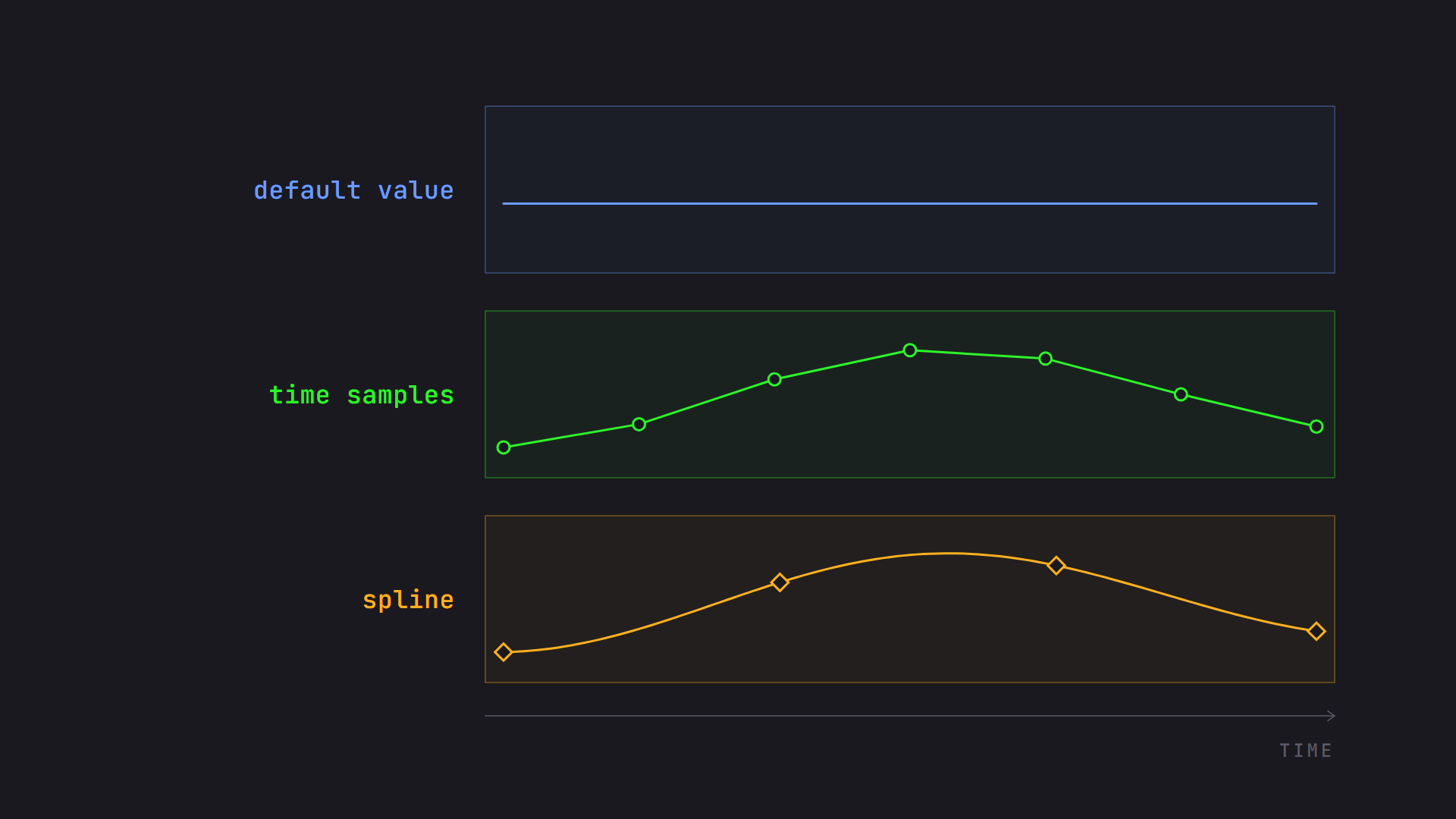
Attributes can hold a value in different ways. The simplest is a default value: a single value that doesn’t change with time. It’s what you get when nothing animated has been authored. The arm’s resting pose is a default value. If the same layer also has time samples or a spline for that attribute, they take over from the default. (Schemas can also supply a built-in fallback value for attributes nobody has authored, which is a separate thing from a default.)
If a value changes over time, you can author time samples, which are values at specific moments. A recorded robot path is a good example. The arm’s joint angles are stored at each sampled moment, and when a tool asks for a moment in between, OpenUSD interpolates between the samples. Time samples are the way USD stores animation, simulation playback, and recorded sensor or robot data. Time samples only interpolate linearly or hold the previous value, so smooth motion like a simulated or recorded path is usually sampled densely, often every frame. That’s one reason splines exist.
There’s also a newer option called splines. Instead of storing a value at every moment, a spline stores a few key points and a curve through them, so the value can be worked out at any time. Splines are meant for floating-point values, and tool support is still uneven, so check that your tools can read them before you rely on them. If an attribute has both time samples and a spline, tools check the time samples first and they win.
Metadata#
Metadata is information about a layer, prim, or property rather than the scene’s geometry and values themselves. Examples are documentation notes, a display name, and custom data that your team defines for its own needs.
Layer metadata is where two important settings live: upAxis and metersPerUnit. The upAxis says which direction is up, either Y or Z, because tools disagree on this. The metersPerUnit says how big one unit in the scene is, such as 1.0 for meters or 0.01 for centimeters. If a CAD model authored in millimeters shows up in a scene authored in meters with no one paying attention to these values, the arm can end up a thousand times too big or too small. Everyone’s layers should agree on them, or the tools that read them need to account for the difference. We’ll come back to this in OpenUSD Pitfalls When Moving Data Between Tools.
How is metadata different from an attribute? The easiest test is time. An attribute can change over time, and metadata can’t. Metadata mostly describes the prim for tools, pipelines, and people, though a few built-in fields, like whether a prim is active, do steer how USD and tools treat it. If you need a value to animate, it’s an attribute. If you need a label that describes a prim, it’s probably metadata.
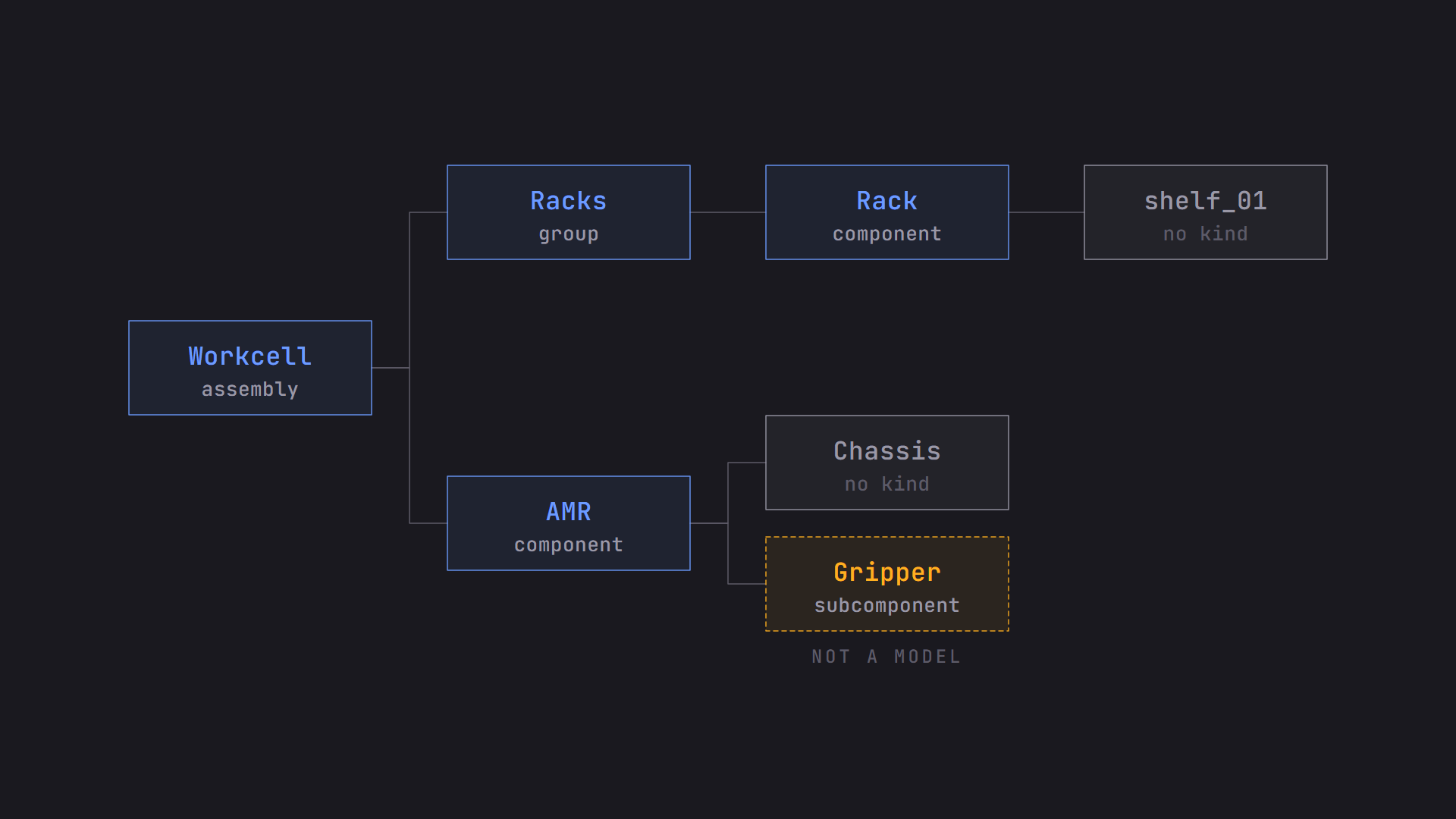
One piece of metadata is worth singling out because you’ll see it in asset workflows: kind. Kind tags a prim with its role in the scene’s organization. Three of the kinds are models, which are the prims that tools treat as meaningful units:
- A component is a complete, publishable asset, like our AMR. It’s the bottom of the model hierarchy, so it can’t contain other models.
- A group organizes related models together. It’s not a publishable asset.
- An assembly is a complete, publishable asset and is a kind of group that gathers larger things, like the whole workcell.
There’s also a subcomponent, which marks an important piece inside a component, like the gripper. It isn’t a model itself. Tools use kind to know what you can pick, select, or load as a unit. Be careful with the vocabulary here. The words “assembly” and “component” in OpenUSD don’t map onto the same words in manufacturing. A mechanical engineer’s assembly isn’t necessarily a USD assembly, and agreeing on which one you mean before the meeting will save you time.
This is the confusion I mentioned at the start, and our AMR is a good example. Because it’s built from a chassis, an arm, and a gripper, a mechanical engineer would call it an assembly. In USD, it’s reasonable to make it a component. USD’s assembly is the level above it, the workcell. Not every prim needs a kind, either. The chassis and shelf_01 in the diagram below have none, and that’s normal.
Schemas#
So far we’ve talked about prims and properties in general. How does a tool know that a prim is a mesh, or that a particular attribute means “radius”? That’s the job of schemas. A schema defines what a prim is, what properties it has, and what they mean. Schemas are what let two applications agree on what a prim is without any extra conversation.
There are two kinds:
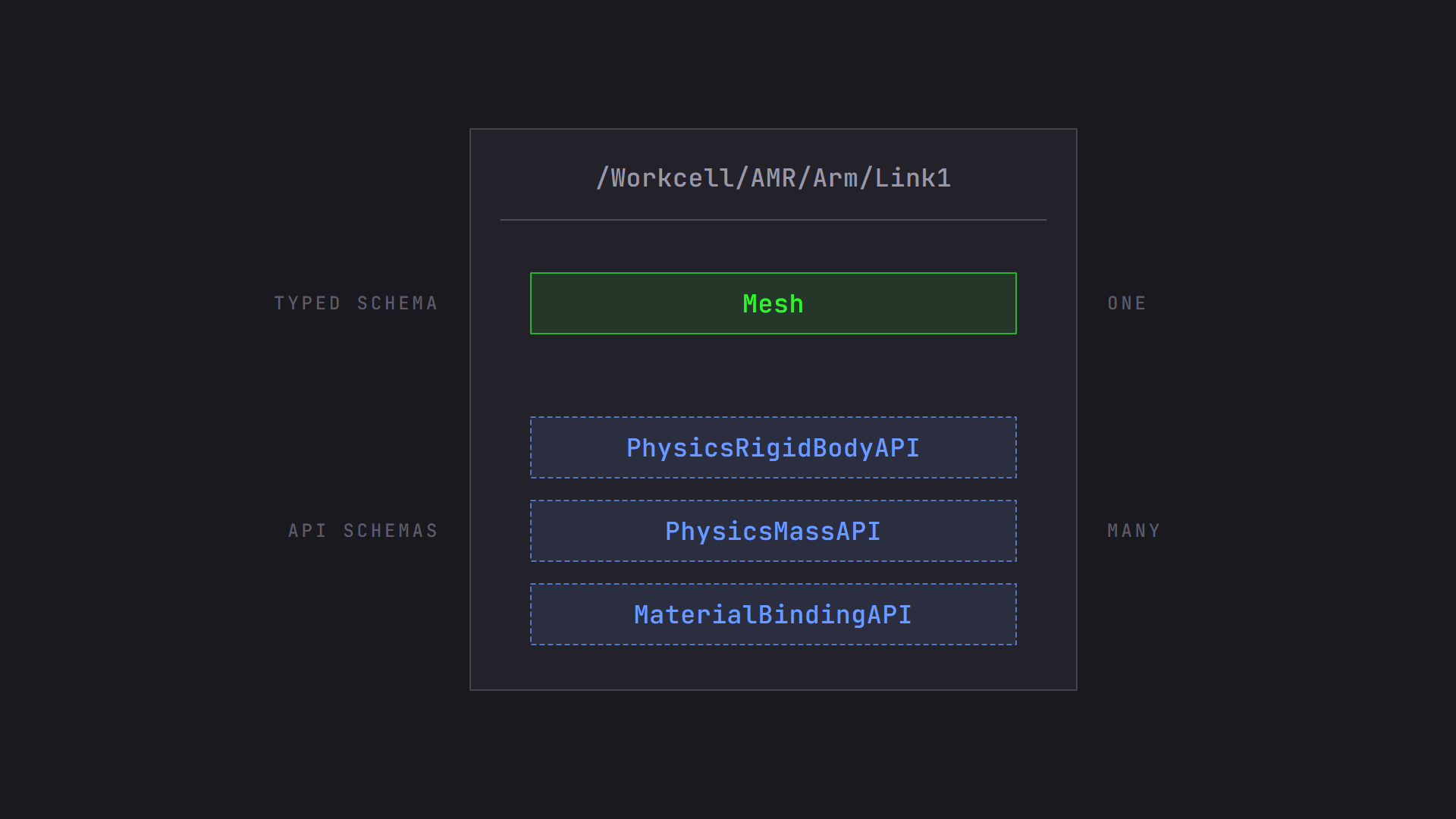
- A typed schema says what a prim is. A prim has at most one type, such as a mesh, a camera, a light, or a transform. Typeless prims are allowed too. The type decides its core identity.
- An API schema adds capabilities to a prim. A prim can have many. Material binding is one, and it adds the relationship we saw earlier. A physics rigid body is another.
In the workcell, the arm’s links are meshes, so the typed schema says they’re meshes. If the robotics team wants those links to behave as rigid bodies in a simulator, they apply a physics API schema. The link is still a mesh, and it now also carries the physics information. If there’s no schema for something you need, like our lidar sensor’s range and field of view, schemas can be extended. I’ll cover when to add a custom property and when to write a custom schema in OpenUSD Pitfalls When Moving Data Between Tools.
Schemas are grouped into families, and you’ll see the family names in documentation and tool menus. Here are the main ones, with the module names you’ll find in the docs:
- Geometry (UsdGeom): meshes, curves, cameras, transforms, and other things you can see or place
- Shading (UsdShade): materials and shaders
- Lighting (UsdLux): lights
- Physics (UsdPhysics): bodies, collisions, and joints
- Skeletal animation (UsdSkel): skeletons, skinning, and blend shapes
- Volumes (UsdVol): smoke, clouds, and other volumetric data
- Rendering (UsdRender): render settings and outputs
- Media (UsdMedia): audio and previews
There are more, such as the semantic labels I mentioned in the last post. The list keeps growing, which is the point of schemas being extensible.
Everyday Building Blocks#
A few more terms come up in almost every conversation about a scene.
An Xform is a prim whose job is to hold a transform, which is a position, rotation, and scale. Most visible prims can carry a transform too, but an Xform exists just to place things. Its children are placed relative to it. If you move the AMR’s Xform, the arm and gripper come along. A Scope groups things but has no transform. You’d use a Scope to organize all of your sensors under one name without moving them anywhere. In our hierarchy diagram, the Materials prim would normally be a Scope. That’s where we can group all of the materials used for an asset.
The word asset is where I see the most confusion. In your pipeline and in USD, an asset is a thing your team makes and publishes, like the AMR or a rack. Separately, USD has a type of value called an asset path, which is how a layer, a reference, or a texture is located. When someone says “the asset is missing,” ask which problem they mean. Is the AMR not publishing, or is an asset path failing to resolve to a texture? The same word covers two different fixes.
What USD Represents, and What It Leaves to Other Software#
Here’s a distinction that saves a lot of confusion: OpenUSD describes and composes a scene. It doesn’t simulate or render one. It does some computing, like combining layers, resolving which opinion wins, and interpolating between time samples. But the heavy lifting belongs to other software that consumes the scene.
The physics schemas are a good example. They describe bodies, collisions, and joints, but there’s no physics engine inside OpenUSD. A simulator reads the description and does the work. Likewise, if the workcell needs live inventory on the racks, the USD scene can describe where the inventory goes, but something outside USD has to keep it up to date.
Rendering follows the same pattern. Hydra, which I introduced when covering viewing a scene in different renderers, is the framework that takes the scene description to a renderer through a plugin. It’s the consumer. The scene stays the same and different consumers do different things with it. We’ll dig into Hydra in the pitfalls post.
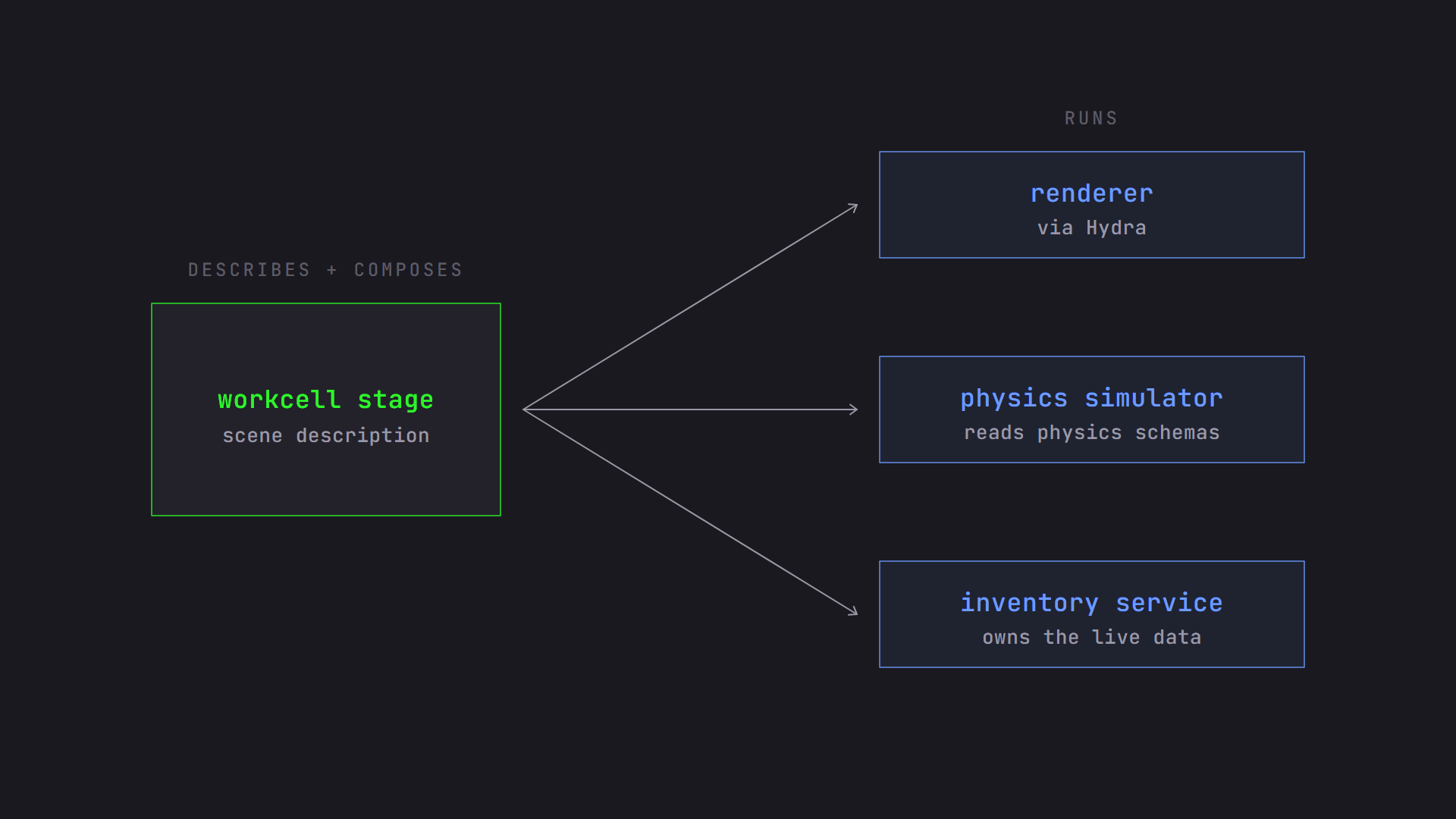
When you’re reviewing a workflow, I find it helpful to ask of each requirement: is this something to describe, or something to run? The first is OpenUSD’s job. For the second, find out which tool does the running and who owns it. The line may become more blurred with the adoption and evolution of OpenExec, OpenUSD’s emerging framework for computing values. But for now, this is a good rule of thumb.
Quick Reference#
| Term | What it means in one line |
|---|---|
| layer | A document containing scene description |
| stage | The composed, in-memory result of one or more layers. A scene. |
| root layer | The main layer a stage opens, which pulls in the others |
| opinion | What a layer says about a part of the scene |
| prim | An object in the scene hierarchy |
| path | A prim or property’s full address, like /Workcell/AMR |
| attribute | A typed value on a prim |
| relationship | A pointer from a prim to other prims or properties |
| collection | A named set of prims, stored as relationships |
| primvar | An attribute carrying renderable data, with interpolation |
| default value | A single value that doesn’t change with time |
| time sample | A value at a specific moment |
| spline | A curve through key values, for float data |
| metadata | Information about a layer, prim, or property. Not time-varying. |
| kind | Metadata describing a prim’s role: component, group, assembly (models), or subcomponent |
| model | A component, group, or assembly prim |
| asset path | A value that locates a file, such as a layer or texture |
| typed schema | What a prim is, at most one per prim |
| API schema | A capability added to a prim, many allowed |
| Xform | A prim whose job is to hold a transform |
| Scope | A grouping prim without a transform |
| Hydra | The framework connecting a scene to renderers |
Which Term Trips Up Your Team?#
Which of these terms causes the most confusion in your team? Tell me in the comments. I’d like to hear which ones overlap with words you already use.
Next up is composition, where we find out how OpenUSD decides which opinion wins.
Comments