LIVERPS Composition Arcs, Prioritized: Master These 4 First
Series: OpenUSD Foundations and Workflows Certification [part 3/3]
- 01 The Case for OpenUSD: What It Solves for Your Teams
- 02 Speaking OpenUSD: Stages, Layers, Prims, and the Words Around Them
- 03 LIVERPS Composition Arcs, Prioritized: Master These 4 First <- you are here
Introduction#
Any team that works in parallel has to decide what happens when two people edit the same document. Software teams use Git. Everyone works freely and conflicts get handled when the work is merged. Even a shared Word doc follows the same pattern. You either break the work into pieces that don’t overlap, or someone reconciles the edits at the end.
OpenUSD takes a different approach: you decide all of that up front. You describe how the pieces fit together and which one wins when they disagree, so there is little or nothing to merge later. That system is called composition, and it’s one of the most distinctive features of OpenUSD. It’s also arguably the hardest to comprehend. The concept is foreign to how most teams work today, and the rules that govern it, called composition arcs, are difficult to wrap your head around.
I know that from experience. When I was learning OpenUSD at DreamWorks Animation, I pestered a colleague every time I ran into an edge case with composition arcs that I hadn’t considered. We spent hours in meetings discussing how to add new data to the pipeline, which composition arcs it should use, and whether that choice covered all of our workflows. Later, I taught LIVERPS to other people and was surprised by how much of my teaching time went to this one aspect of OpenUSD.
This post is the third in a series for people preparing for the OpenUSD Foundations and Workflows certification. By the end, you should understand what composition is and why it matters, know when to apply the four composition arcs you’ll meet most often, and be able to explain why a value someone authored isn’t showing up on the stage.
Composition and Its Arcs#
In the last post, we described the stage as the result of evaluating all of the layers that make up a scene and deciding how to piece them together. The rules for piecing them together are the composition arcs. Each arc is a different way of saying “bring this other content in here.”
OpenUSD has seven composition arcs: sublayers, inherits, variant sets, relocates, references, payloads, and specializes. I’ll mention all of them briefly, because you need the full list to understand how LIVERPS strength ordering works. But I’ll go in depth on only four: sublayers, references, payloads, and variant sets.
These are the arcs you’ll encounter most often, and they provide the most value when you’re starting out with OpenUSD. You can build a robust pipeline with just these four, and probably with even fewer. Then you can adopt the other arcs as the need arises.
I’ve simplified how I explain composition arcs and LIVERPS in this post so they’re approachable for the whole team. If you’re an engineer who wants every detail, continue with Learn OpenUSD or the OpenUSD documentation.
Each of the four has a different role:
| Arc | Role |
|---|---|
| sublayers | Split work into parallel streams that share one scene hierarchy |
| references | Assemble a scene out of reusable assets |
| payloads | Do what references do, but the content can be loaded or unloaded on demand |
| variant sets | Configure several variations of one asset together |
Sublayers#
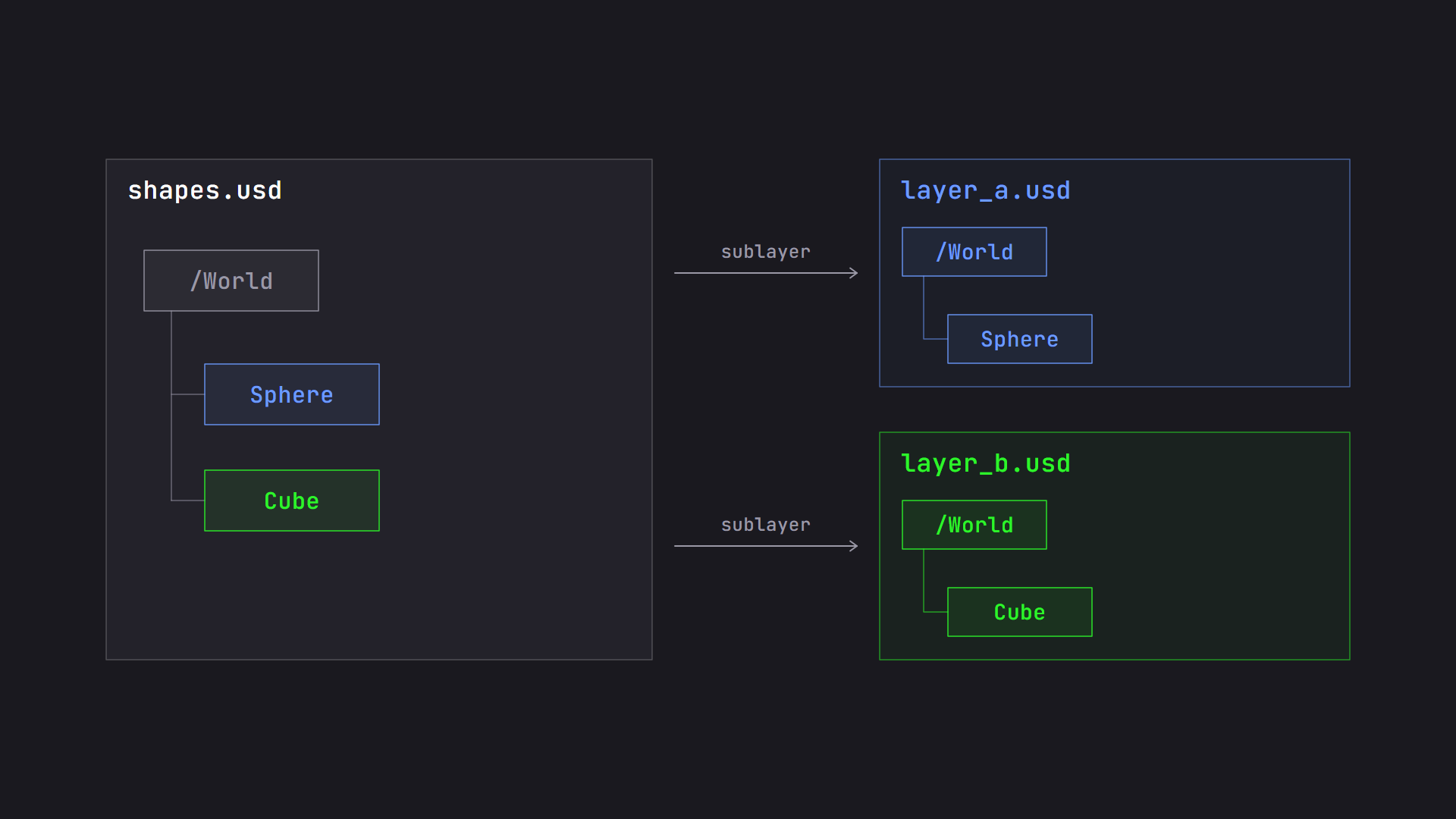
Two sublayers add to the same /World prim, and the root layer sees both.
Sublayers are how you split up work. A layer can list any number of other layers as its sublayers, and OpenUSD combines them in an “include” fashion. What that means is that they all work within the same context and share the same scenegraph hierarchy. If the root prim is /World, one sublayer can add a sphere at /World/Sphere and another can add a cube at /World/Cube. Both end up under the same /World prim.
This is how we break work into workstreams. A workstream might be work contributed by different coworkers on the same team, by different teams, or by different applications. Sublayers are one of the mechanisms that let all of them work in parallel. In our workcell, the facility, safety, and robotics teams each own a sublayer, so none of them has to wait on the others.
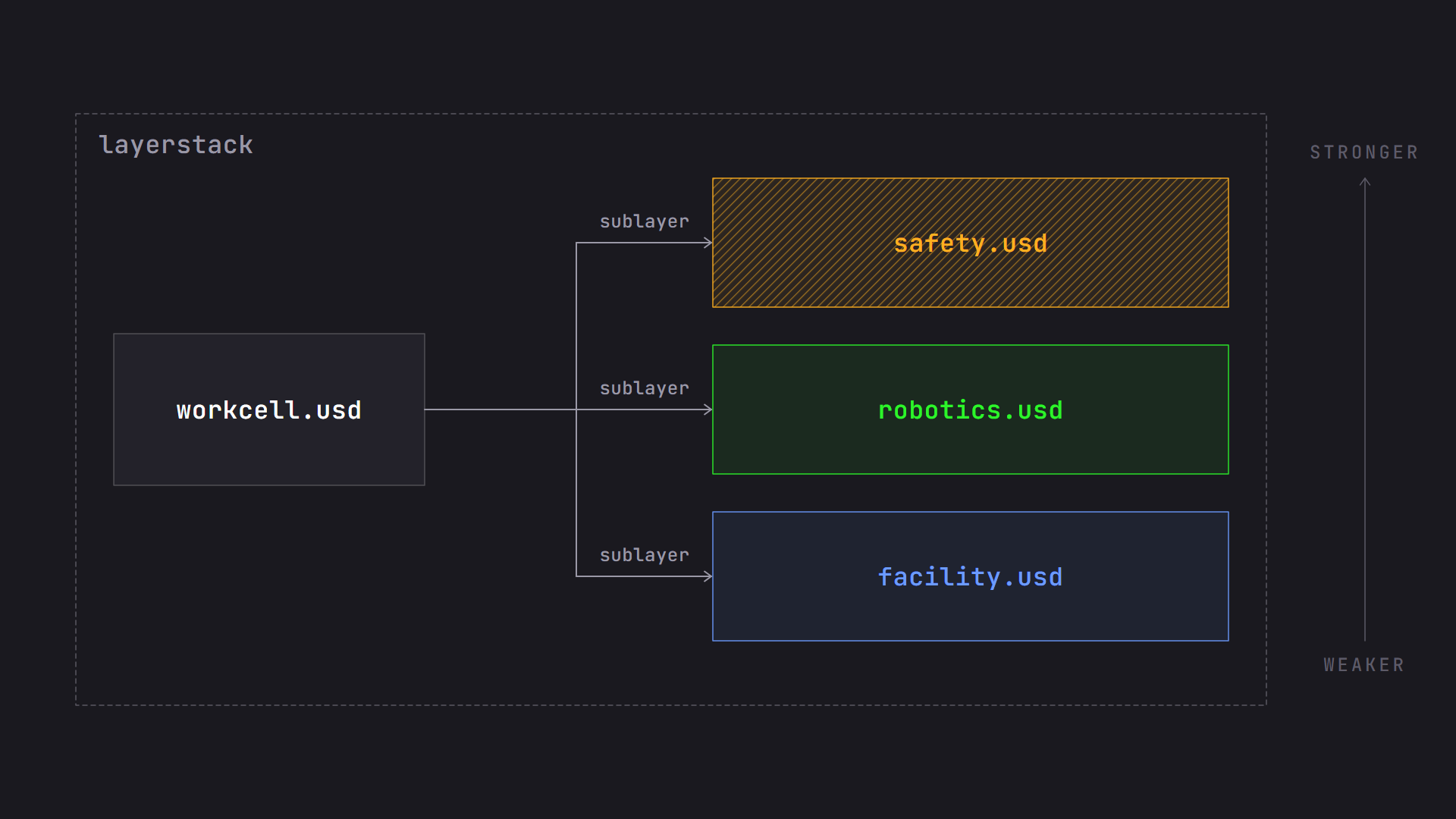
The workcell root layer lists three sublayers. The first in the list is the strongest.
At the risk of aging myself, I think of sublayers as transparencies on an overhead projector. Each contributor draws on their own sheet, and when you stack the sheets and project them, you see one combined picture. Nobody drew on anyone else’s sheet. If two sheets draw something in the same spot, you might have a conflict to resolve. For sublayers, the layer that comes first in the list has the strongest opinion. It’s what you’ll see on the stage.
A layer and all of its sublayers together are called a layerstack. You’ll hear that term often, and it’s important for understanding LIVERPS later in this post.
References#
References are the main mechanism for assembling larger scenes out of other assets. A reference includes a layer, much like a sublayer does, but with two important differences: you choose a prim from the target layer to reference, and you choose where in the scenegraph the content lands.
If I have a prim at /Workcell/Racks, I can reference several rack assets underneath it and end up with /Workcell/Racks/Rack_01, /Workcell/Racks/Rack_02, and so on. I can effectively rename the incoming prim whatever I want and put it where I want in the hierarchy. All of the incoming prim’s descendants come in with it, so I get the meshes, materials, and everything else that makes up the rack.
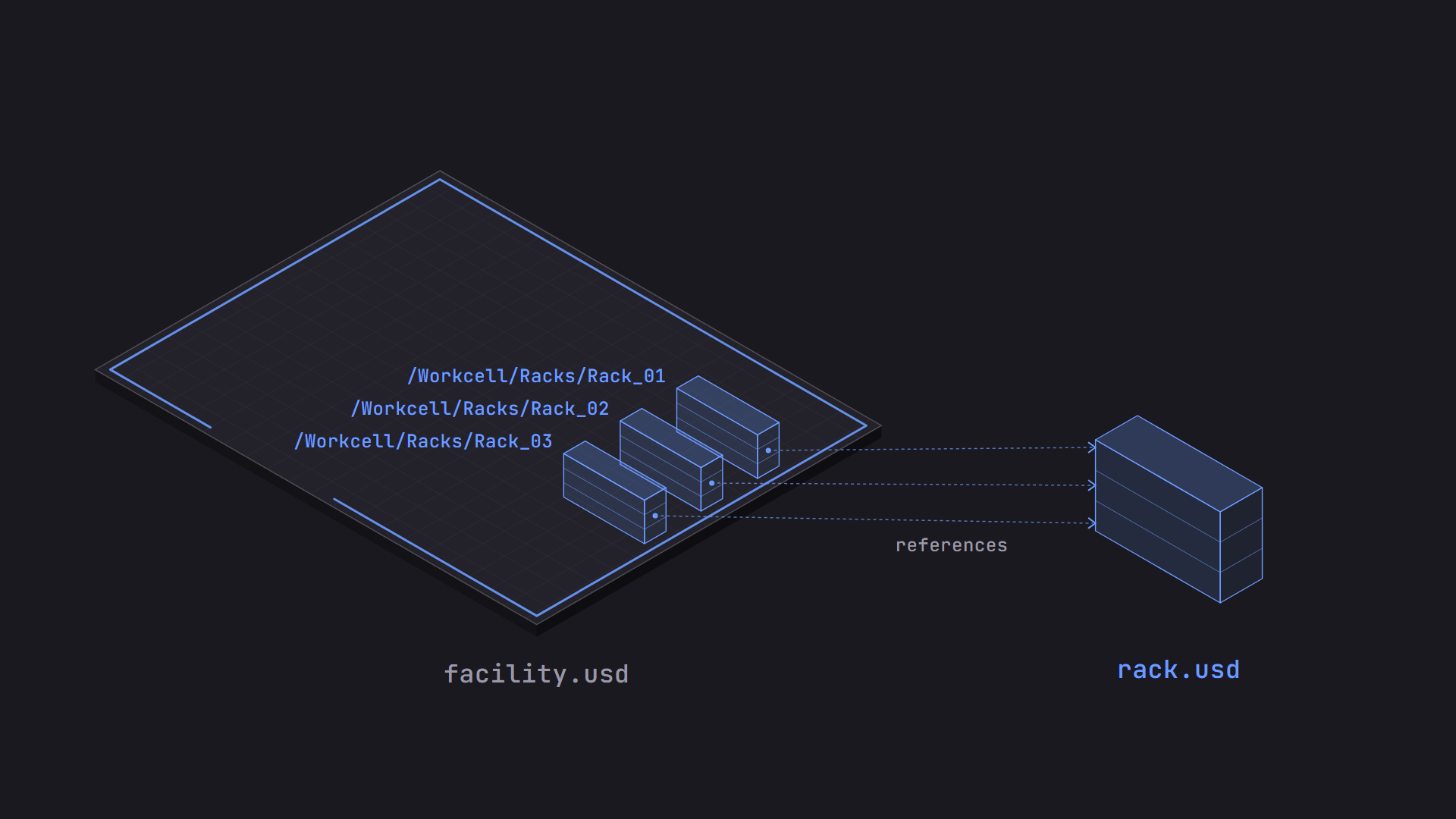
Three prims in facility.usd reference the same rack.usd asset.
This is the composition arc you’ll encounter most often as an end user, whether you’re assembling a scene from other assets or working in a scene that has already been assembled for you.
References allow for reuse. I can use the same rack asset several times on one stage, and I can use it on other stages too. A change to the source rack updates every rack across the project, unless you’re using a versioning mechanism to control which stages pick up the change.
One more detail that matters for LIVERPS: a reference targets a whole layerstack. The target layer, its sublayers, and any arcs inside it come in together as one unit, ranked as a reference.
Payloads#
Payloads are very much like references. They let you target a layer and bring its content into your scenegraph wherever you choose. The difference is that payloads can be loaded or unloaded on demand. You can open a stage with one or more payloads unloaded, and OpenUSD skips fetching and processing that content until you tell it to load.
OpenUSD is good at loading lots of content quickly, but skipping the content you don’t need makes working even faster. Imagine you’re working on a single block of a large city. You don’t need all of the content several miles away to do your work, so you open the stage with the other blocks unloaded. The content is still there if and when you need it. In the workcell, the AMR’s internals, like the battery packs, wiring, and gearboxes, are detailed CAD that a simulation rarely needs. You could put them behind a payload so you can load the AMR with the internals unloaded to simplify the simulation, but be sure to keep what the simulation needs, like mass and collision shapes, outside the payload.
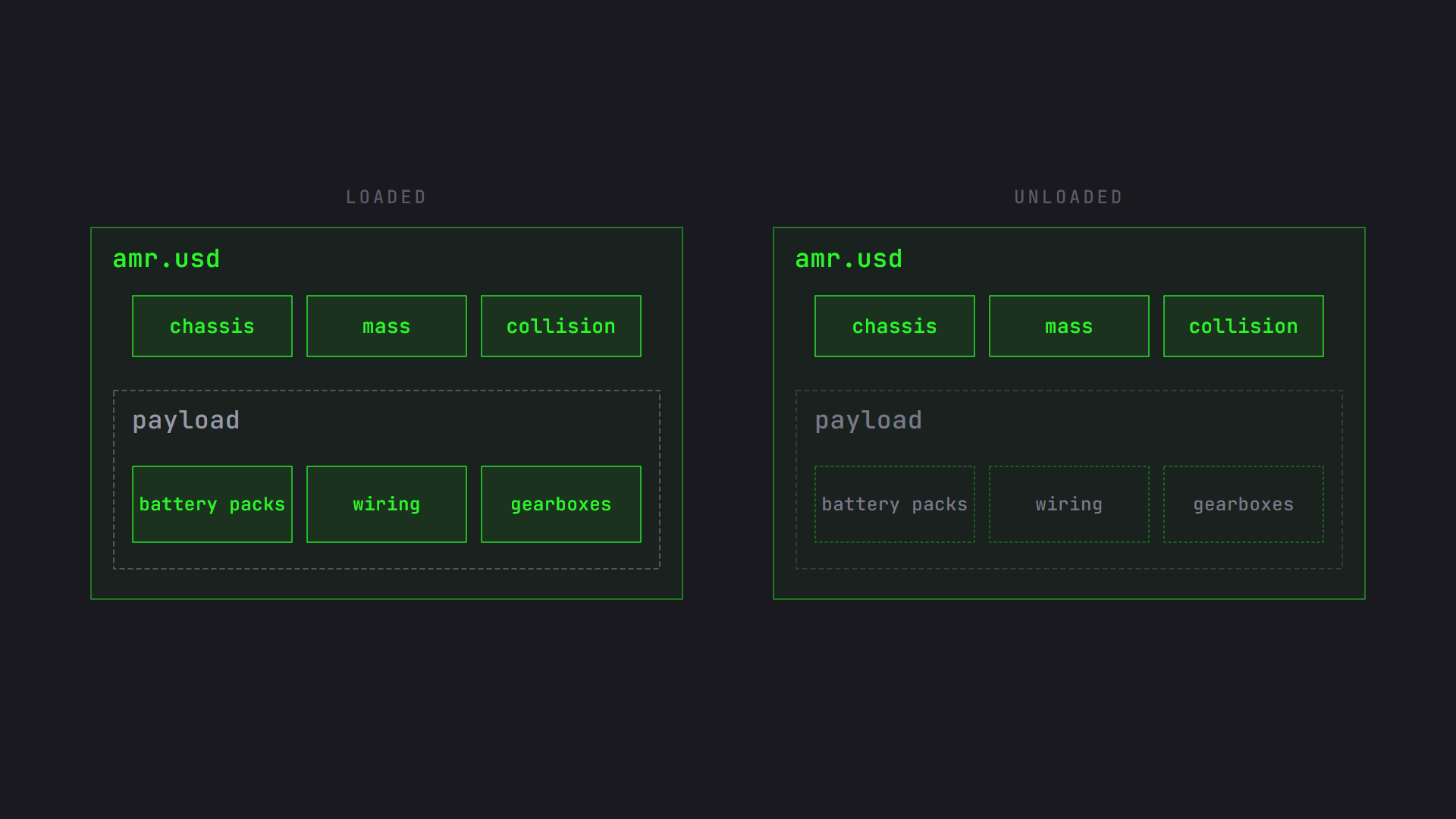
The AMR with its payload loaded and unloaded.
As an end user, you may want to unload payloads or load them after you’ve opened a stage, so it’s useful to know this feature exists. It’s also a good first thing to try when a scene feels heavy, and we’ll come back to it in Scaling Big Scenes in OpenUSD.
Variant Sets#
Variant sets let you author and swap different variations of one asset. They collapse several similar assets into a single asset with variations.
In the first post, the AMR came with a suction gripper or a two-finger gripper. Without variants, you’d create two different AMRs representing each gripper configuration, and every change to the shared parts of the AMR would have to be made in each file. With a variant set, it’s one asset, and a change to the shared parts is made in one place.
An asset can have more than one variant set. The AMR could have one set for the gripper, another for the paint, and another for the mast height. Each set can be swapped independently of the others. Pick two-finger from the gripper set and grey from the paint set, and you get a grey AMR with a two-finger gripper.
Keep in mind that the sets don’t know about each other. Three paints, two grippers, and two mast heights give you 12 combinations you can select, from only 7 variants authored. But if your intent is that all 12 combinations are valid, you need to test all 12, and you may need to tweak some so they work together. Say the short mast and the two-finger gripper collide, because at the arm’s resting pose the fingers reach into the chassis. Each variant works on its own, and the problem only appears when both are selected. Fixing it means authoring values for that specific combination, such as a different resting pose when both are active. You can nest one variant set inside a variant of another, or fold the choices that interact into a single variant set where each combination is authored on purpose.
The number of combinations you need to verify is the real cost of variant sets, and it grows with every set you add. Variant sets work best for choices that are truly independent, like paint, and the testing is worth automating.
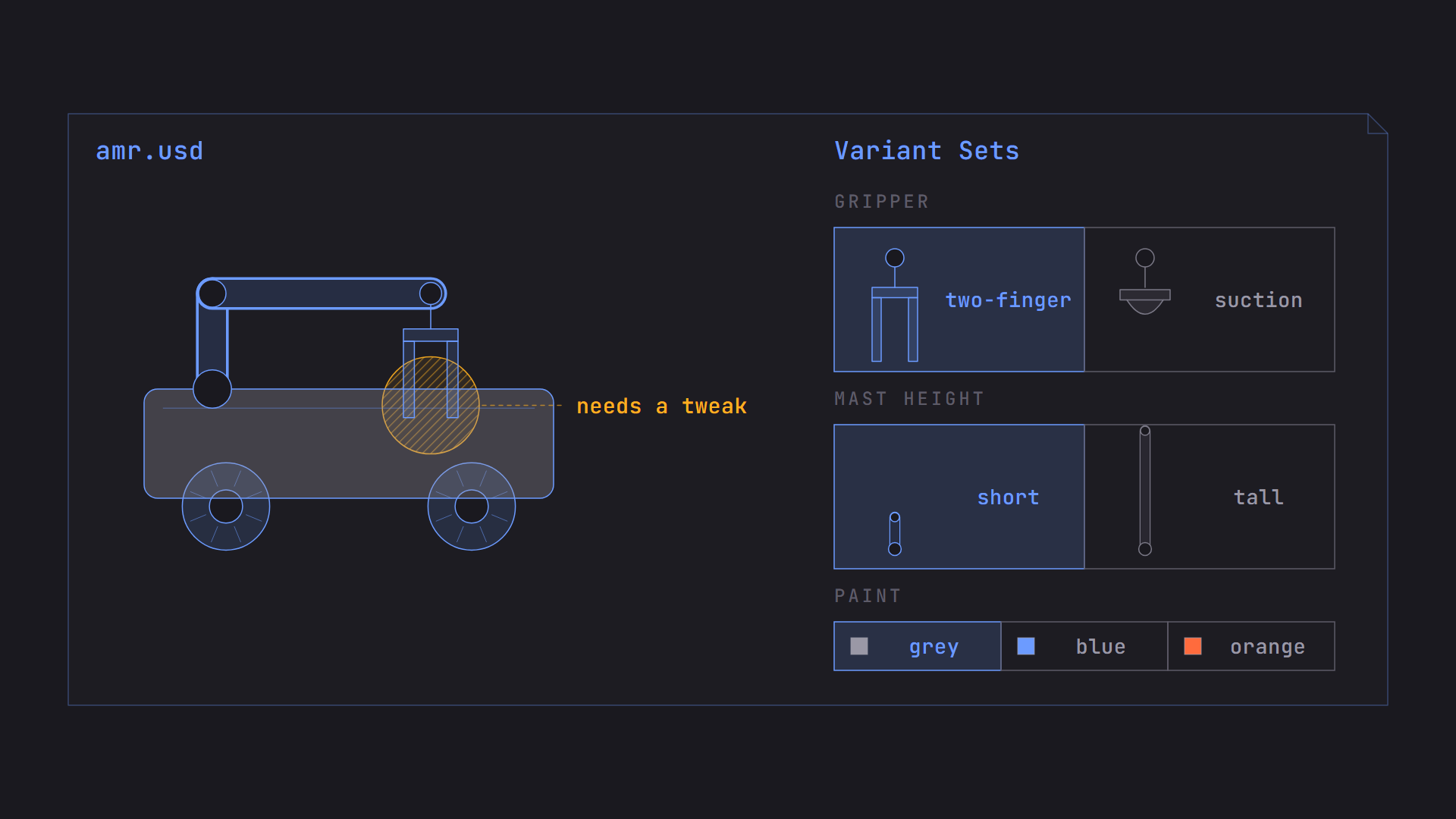
Three variant sets on one AMR. Each set switches independently, so every combination you intend to support needs testing.
As an end user, you may be authoring a variant set for an asset, or you may be swapping the variants of an asset you’re using. Where variants sit in the strength order matters for both. Let’s dig into that next.
LIVERPS Strength Ordering#
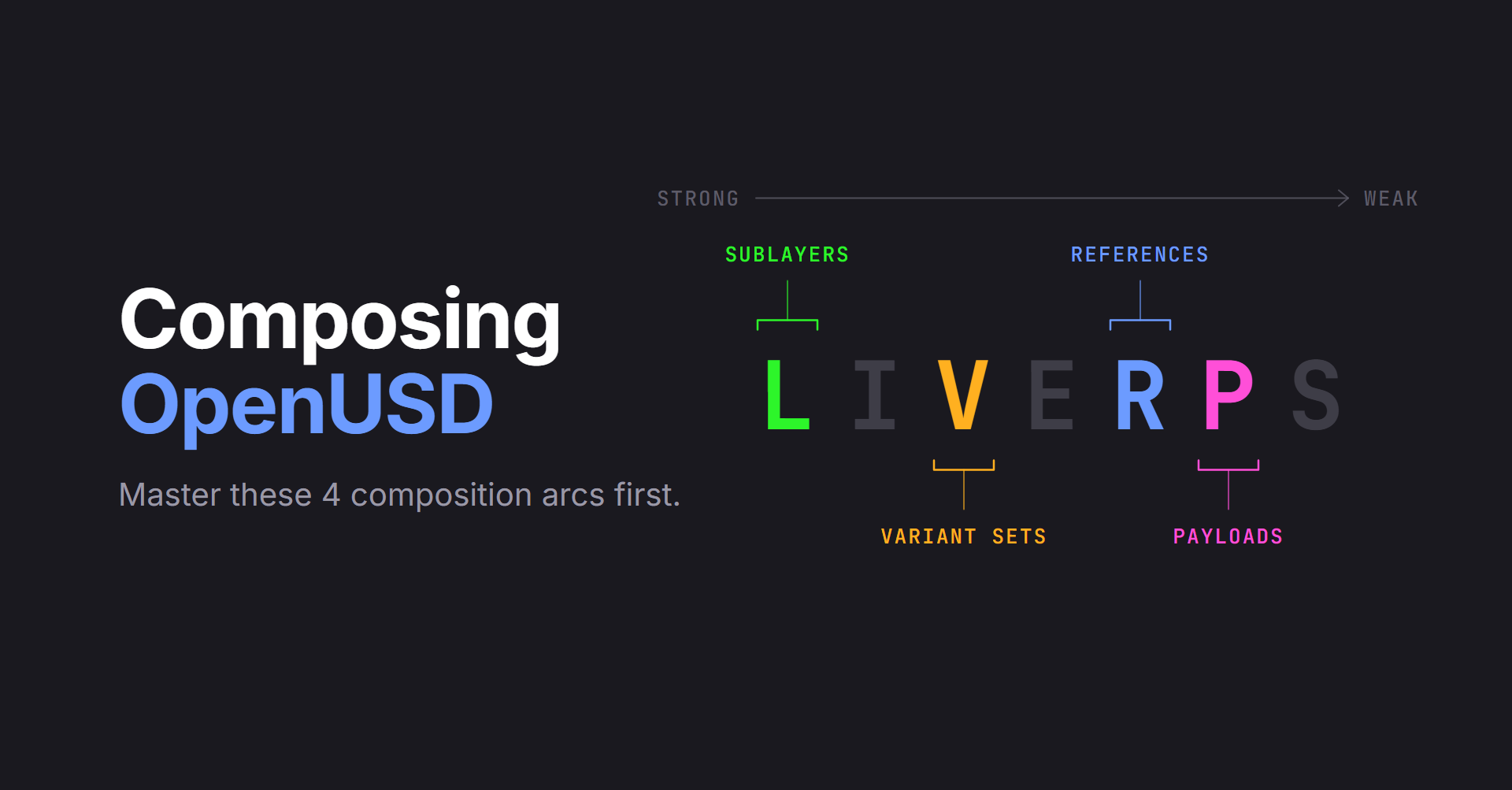
We now have several ways to bring content into a scene, and each can have an opinion about the same prim or property. LIVERPS is the order that decides which opinion wins. Each letter is a composition arc, from strongest to weakest:
| Arc | Strength | |
|---|---|---|
| L | Local | Strongest |
| I | Inherits | |
| V | Variant sets | |
| E | Relocates | |
| R | References | |
| P | Payloads | |
| S | Specializes | Weakest |
(You may also see it written as LIVRPS. Older docs leave relocates out of the acronym.)
Here’s a quick look at the three arcs we aren’t covering in depth:
- inherits: Lets a prim pick up opinions from a shared “class” prim. Change the class, and everything that inherits from it changes together.
- relocates: Moves or renames a prim that arrived through a reference, without editing the asset it came from.
- specializes: Like inherits, but it’s always the weakest, so any other opinion overrides it. Think of it like a fallback.
You may have noticed that sublayers are the only composition arc without their own letter. That’s because they’re part of the L, which stands for Local, not sublayers. The Local opinions are everything authored directly in the current layerstack: the layer’s own opinions plus the opinions in all of its sublayers. This is why I introduced layerstacks earlier. For the purposes of LIVERPS, a layer and its sublayers act as one unit, and the order of the sublayer list breaks any ties inside it.
Reading the list from the top gives us a few useful rules:
- Local opinions beat anything you brought in separately. If the root layer sets the gripper’s color, that wins over what the referenced AMR asset says. This is how you override a reusable asset in one scene without touching the asset.
- Variants are stronger than references. On the same prim, a variant’s opinion beats anything that prim references. Local opinions still beat both.
- References and payloads are near the bottom. The incoming asset is the baseline, and the scene around it gets to change it.
The LIVERPS ordering also applies again inside everything you bring in. Because a reference or payload targets a whole layerstack, the AMR asset has its own local opinions, its own variants, and its own references, all ordered by the same rules. LIVERPS gets applied over and over down the chain. A rough rule of thumb is that the closer an opinion is to the scene you’re looking at, the stronger it is. The farther it came from, the weaker it is.
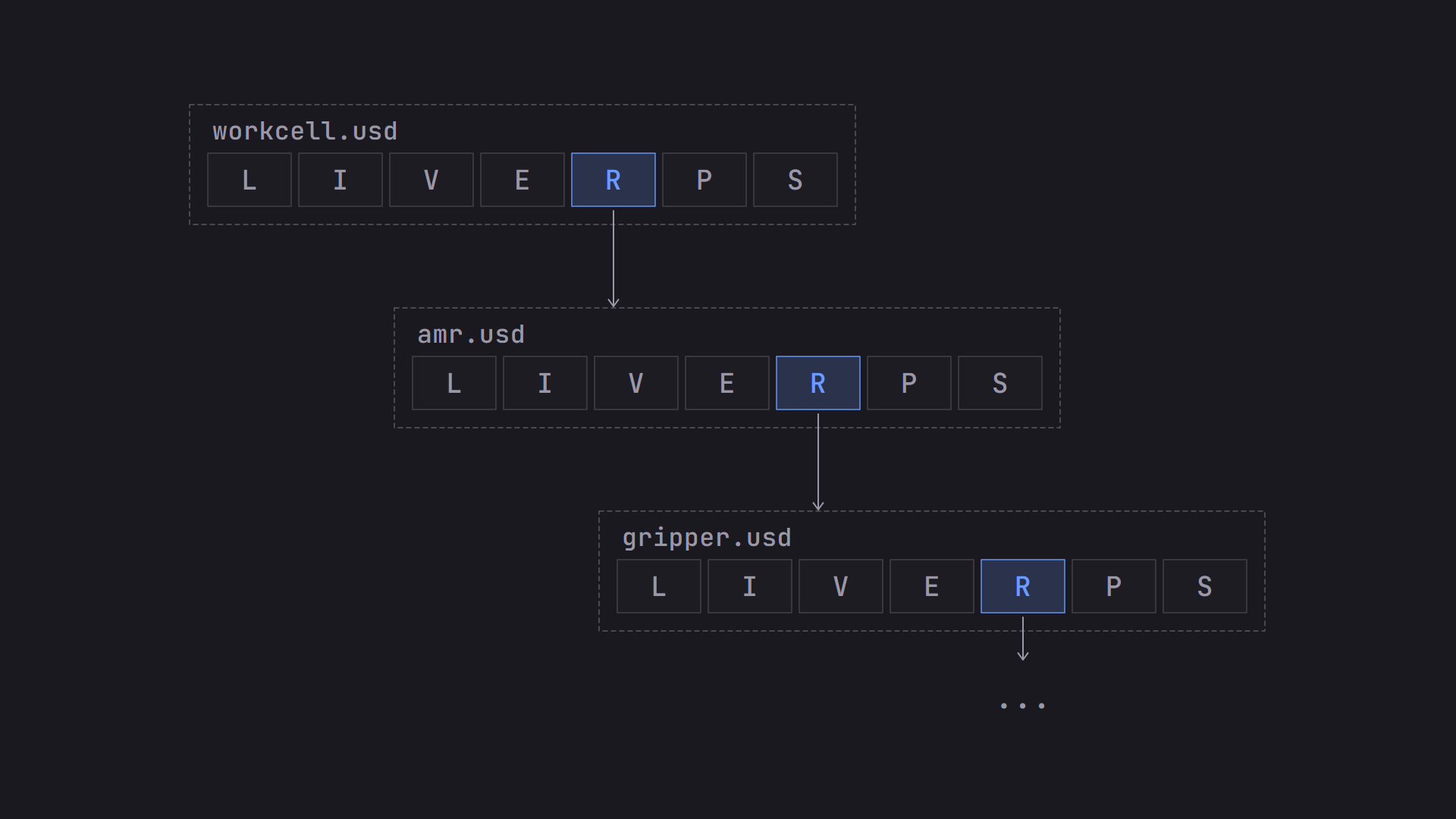
LIVERPS applies again inside every layerstack you reference.
Choosing Arcs From Requirements#
In practice, you’ll usually start from a workflow requirement, not from an arc. Here’s how I would map them:
| If the requirement is… | Use… |
|---|---|
| Several people or teams need to work on the same scene at the same time | sublayers |
| We want to build a scene from reusable assets | references |
| The scene is too heavy to open, and not everyone needs all of it | payloads |
| One asset needs a few swappable variations | variant sets |
| One scene needs to override something in a reusable asset | A local opinion in the root layer or sublayer |
These aren’t exclusive, and real pipelines combine them. The workcell could use sublayers for each team’s workstream, a reference for each rack, payloads on the heaviest assets, and a variant set on the AMR.
Two questions help when you’re not sure. First, is this content part of the same scene, or is it a separate thing I’m bringing in? Content in the same scene points to sublayers, and a separate reusable asset points to references. Second, do I need to be able to leave it unloaded for performance? If so, use a payload instead of a reference. You can also combine the two with the reference-payload pattern, which we will talk more about in Scaling Big Scenes in OpenUSD. If a requirement doesn’t fit any of these, that’s when to look at the other arcs.
Why Isn’t My Opinion Showing Up?#
This is the question that ties the whole post together, and it’s one you’ll hear often as a user of OpenUSD. Someone authored a value, and the stage shows something else. Usually nothing is broken. Another opinion is stronger. Here’s a checklist I’d work through:
- You’re working with an older version of the asset. If your pipeline uses versioning, the asset may be pinned to an older version.
- A stronger layer is overriding it. A layer earlier in the sublayer list, or a stronger arc, has its own opinion on the same thing. Your opinion is still there, but it lost.
- A local opinion is beating your variant. You switched the AMR’s paint to grey, but the root layer has an opinion that sets the color to blue. Local is stronger than variants, so blue wins and the switch appears to do nothing.
- It’s in a payload that isn’t loaded. If a payload is unloaded, none of its opinions are on the stage. Load the payload and the opinion shows up.
- It was authored somewhere that isn’t part of the stage. The layer might not be in the layerstack, might be muted, or the edit may have gone into a different layer than you intended.
- It’s inside a variant that isn’t selected. Opinions in a variant only apply when that variant is selected.
To diagnose any of these, ask the stage instead of guessing. Tools like usdview can show you every opinion on a property and the layer or arc each one came from, ordered from strongest to weakest. The strongest one is what you see on the stage. The others are still there, which is the non-destructive editing we talked about in the first post, and this view is how you find out where the overrides are coming from.
If you can look at a stage and explain that a value comes from the root layer’s local opinion, which beats the referenced asset you were editing, you understand the core of composition.
Quick Reference#
- Sublayers: Splits work into parallel workstreams. First in the list is strongest. Part of Local.
- References: Brings in a reusable asset wherever you choose. Targets a whole layerstack.
- Payloads: Like references, but can be unloaded. Faster to open, so load what you need.
- Variant sets: Switches between versions of one asset. Test every combination you intend to support. Weaker than local.
- Inherits: Shares opinions from a class prim. Change the class, change everything that inherits.
- Relocates: Moves or renames a prim that came from a reference. Doesn’t edit the source asset.
- Specializes: Like inherits, but always the weakest. Any other opinion overrides it.
LIVERPS, strongest to weakest: Local, Inherits, Variant sets, rElocates, References, Payloads, Specializes.
Which Arc Would Your Team Use First?#
Think about how your team handles parallel work today. Is it a merge at the end, a shared document split into sections, or something else? Which of the four arcs would replace it first?
Leave a comment and tell me. I read every response, and your answers help shape the rest of the series.
I’ve started to hint at workflows and asset pipelines in these first three posts. In the next post, Designing a Layered Asset Pipeline Using OpenUSD, we’ll really dig into defining pipeline requirements from workflows and making decisions in OpenUSD using composition arcs and other features to support those requirements.
Comments